Watchdog and recovery script (UPDD 6)
This document applies to UPDD 6. The watchdog service is not part of UPDD 7.
The UPDD watchdog service is a daemon process looking for specific software or hardware failures that may cause the UPDD software (and therefore touch) to stop responding. Whilst UPDD is written to be robust in a wide variety of target environments, there are occasionally unusual situations where the software needs to be reset in some way, and the watchdog service provides an extensible implementation in support of this.
There are two main aspects of the watchdog service: watchdog events and a recovery script. Both are described below.
In UPDD 7 the watchdog service is not active: the driver does not raise any of the events below, so setting watchdog.events has no effect.
Watchdog events
A watchdog event is a symbol that identifies a predefined error case. The following events are defined:
| Event | Description |
| usbenum | The USB enumeration process has stalled. Typically this occurs when a controller does not respond and the USB stack becomes frozen. |
| usberror | A USB open operation has failed, as seen in our diagnostics log: |
| maxreaderrors | A USB read operation has failed repeatedly with no successful reads in between. This sometimes occurs when a device enters a bad state, for example after an EMF event. |
By default no events are monitored, as in our experience most systems do not experience lock-up issues that need recovery and therefore it is unnecessary to run the monitoring service. In environments that do require this service, the global setting watchdog.events defines which events are active, as a comma separated list.
The driver must also include the recovery script, which is used to forcibly restart UPDD. The script is only present in a driver built to include it, so please ask us for such a build if you need this service.
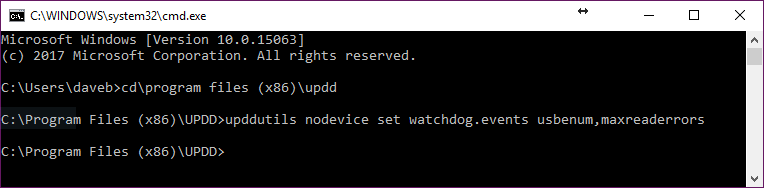
The setting can be preset in a UPDD software bundle or set using the UPDD command line interface. In this Windows example two events are set active using upddutils:
The feature is active the next time the driver starts after changing this setting.
Recovery script
The recovery script is called whenever a watchdog event is triggered, that is, when the related error occurs. It will be in one of the following locations:
| Operating system | Location |
| Windows | <upddinstallfolder>\recover.bat |
| macOS | /Library/Application Support/UPDD/recover.sh |
| Linux | /opt/updd/recover.sh |
The triggered event is passed as an argument to the recovery script, e.g. if usbenum occurs on a Mac system, /Library/Application Support/UPDD/recover.sh usbenum is executed. The script is executed with elevated privileges.
The script contains the commands used to recover from the detected error, such as restarting the failed component, or using Windows DevCon to clear a device error state in the case of a USB communication error under Windows. The main aim of the watchdog service is to identify an error and call a predefined script containing the commands needed to address it; the script commands need to be assessed on a case by case basis.
Windows .bat files may not offer some advanced scripting options, but they are easy to use, cater for most scripting requirements and can launch a script in a more advanced scripting language if required.