API example programs
This document lists the example programs available to illustrate the UPDD API, with source code. They were written for UPDD V6; the notes below say what to change for UPDD V7.
| Example | Description |
| Console mode program | Example non-GUI console program in C++, with source code, demonstrating the UPDD API interface. |
| Calibration program | A simple text based calibration routine. |
| C sharp | Supplied to see the API used in a C# program. |
| Delphi | Example program for the Delphi language. |
| Python | Definitions for using the API from Python with ctypes, and an example script. |
| UPDD Test program | The source of the UPDD Test program that ships with the driver. |
| hidfeature | HID get and set feature requests (macOS). |
| post_hid | Posting HID packets into the driver (data injection). |
| Slider demos | Multi-touch sliders in Qt, using TUIO or the Qt plugin. |
Calibration program
A simple text based calibration utility to illustrate the basics of implementing a custom calibration program is available here.
A practical implementation will likely implement a GUI to show calibration targets to be touched. Comments in the source code describe the implementation in detail.
The program also illustrates the use of event callbacks and setting a UPDD setting with TBApiSetSettingFromInt.
C sharp
This simple C# example is supplied to show a basic demo of the API used in a C# program. The program outputs multi-device / multi-touch data and actual screen co-ordinates.
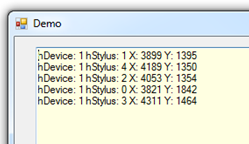
A customer created a variant of this example to form the basis of an application that could handle direct input from multiple touch screens. For the purposes of their project they needed to make some changes to overcome the thread lagging that occurred with multiple touches, by eliminating string processing and output to the console. The modified C# demo uses .NET 4 and a thread-safe collection, and updates the display on the UI thread at a set interval; these changes virtually eliminate the multi-touch lag.
The example project targets 32-bit (x86) and calls upddapi.dll. The main upddapi.dll of UPDD V7 is 64-bit; a 32-bit build of the V7 API is installed in C:\Program Files\UPDD\v6 (see API files).
Delphi
This example uses the UPDD API from Delphi on Windows.
Accessing the UPDD API can be achieved by calling its DLL exported functions in the same way as you might for Windows API functions, but to do so you need declarations to allow the calling program to link correctly with these functions. The .dpr sample provided here, apidemo.zip, illustrates this and provides declarations for the most commonly used features of the API. To use other features of the API, refer to the C header file upddapi.h, which is installed with the driver; using this and the examples in apidemo.dpr it should be straightforward to achieve this.
This sample is for illustration and is not expected to be used as is: there is no error checking, and the code structure should be adapted to your specific needs. The specific aspects illustrated are:
- Loading the API library
- Referencing functions within the API library
- Opening and verifying a connection to the driver
- Closing the driver after use
- Setting an integer value in UPDD settings
- Setting a string value in UPDD settings
- Getting an integer value in UPDD settings
- Getting a string value in UPDD settings
- Registering to receive callbacks for multiple event types
- Implementing the callback handler
- Getting a handle to the first device registered with UPDD
- A method to access the common data area of the callback record (a union in C terms)
Pay particular attention to the comments around thread safety in the callback, especially if you need to perform UI actions in response to a callback. In a typical GUI application UI actions must be handled in the primary (UI) thread, so an event should be posted to that thread and handled there.
This implementation is for 64-bit only. For UPDD V7, 64-bit support is the default; the library reference
SetCurrentDir('c:\program files (x86)\updd\x64api');
h_updd := LoadLibrary('upddapi_x64.dll');
should be changed to
SetCurrentDir('c:\program files\updd');
h_updd := LoadLibrary('upddapi.dll');
Accessing the flags bits of the DigitiserSubEvent record
In the C definition of the struct digitiserEvent, the first byte is a series of bit flags representing various states relating to touch or pen. In the equivalent Delphi record DigitiserSubEvent there is a corresponding byte named flags. To access the individual flag bits in Delphi use the logical and operator. For example, if the expression flags and 1 is true then the tipSwitch / touchingLeft bit is set.
Python
Python scripts can use the UPDD API through the ctypes library. To that end upddapi.py provides definitions for the UPDD API's important constants, structures (such as _PointerEvent) and functions, as well as a few convenience functions to help common use cases.
Generally, the UPDD API works the same in Python as it does in C or C++. There are a few Python specific caveats regarding callback functions, such as those passed to TBApiRegisterEvent:
- Callback functions are executed in a dedicated thread managed by the UPDD API. We recommend using Python's threading or asynchronous libraries to process events in a Python-controlled thread.
- Pointers to a C structure passed to callback functions are not guaranteed to remain valid after the callback function finishes executing. It is best to make your own copy of that structure for further processing, since it will remain valid as long as Python has a reference to it.
upddapi.py provides two convenience functions to help mitigate these issues:
- create_event_callback: returns a ctypes callback that can be passed to TBApiRegisterEvent. It takes as its only argument a Python function with two parameters: the event type, and the event itself. It automatically handles copying the pointer provided by the UPDD API into a _PointerEvent ctypes structure whose memory is managed by Python normally.
- create_event_callback_async: the same as create_event_callback, but you pass it an asynchronous function, for scripts that use Python's asyncio library. It has one optional keyword argument, event_loop, which specifies the event loop that the asynchronous function will be called in. If it is not provided, the current event loop is used.
Here is a simple script demonstrating the use of upddapi.py with Python's asyncio library to process digitiser events safely in Python's main thread.
UPDD Test source
The UPDD Test program is available to test the driver's API and TUIO interfaces and is normally shipped and installed with the driver. Its source is available here. This source is for version UPDD Test 1.4.6, dated 11 July 2022.
The source code needs to be processed with Qt's tools, either qmake or Qt Creator.
When compiling on Windows, the resulting executable needs access to upddapi.dll. Rather than copying this file from the UPDD folder to your current working directory, set the working directory to the UPDD application folder. In Qt Creator:
- Switch to "Projects" mode.
- Select "Build & Run" > Run.
- Set the working directory field to C:\Program Files\UPDD.
UPDD Test supersedes the earlier set of Qt paint programs, which illustrated receiving touch data through the UPDD API, the TUIO protocol and Qt touch events.
For review
Downloads: every example here is still a V6-era file on v6download.touch-base.com (cbconsoleV6.zip, text-calibration-v6.zip, csharp_api_example_v6.zip, apidemo.zip, updd-test-src.zip, upddapi.py). Link liveness was not checked. The repository holds current copies of cbconsole, text_calibration, hidfeature, post_hid and csharp under C:\devl\07_01\examples; consider publishing those and moving the links to one host.
C#: the sample is a .NET 2.0 project with PlatformTarget x86 (examples/csharp/450101.csproj:13,59,68) that P/Invokes upddapi.dll, so it cannot load the 64-bit V7 upddapi.dll unchanged. Please decide whether to recommend the 32-bit V7 build in \v6 or publish an x64 sample, and say which here.
UPDD Test: the current release is 1.5.9 (touchbase-apps updd-test/updd-test.pro:11); the zip is described as 1.4.6, and its contents could not be checked. The Delphi paragraph on downloading a V6 64-bit API was dropped with the retired V6 64-bit API files page.