API event reference
This document describes the callback events delivered to functions registered with TBApiRegisterEvent, as declared in upddapi.h, for UPDD V6 and V7. How to register for events and handle them safely is described in Connecting to the driver and receiving events.
Every event is delivered in a _PointerEvent structure. Its general fields include hDevice (the device handle the event relates to, or 0 if it is not device specific), hStylus (the stylus number, also known as the contact number or touch number), type (the event type, indicating which member of the union pe is populated), calibrating (set to 1 if calibration is active; most client applications, i.e. those that are not calibration programs, should ignore events with this set), monitor_number and timestamp.
Event types
The following event type constants can be ORed together in a call to TBApiRegisterEvent:
| Constant | Value | Description |
| _EventTypeXY | 0x0001 | Pointer co-ordinates |
| _EventTypeEval | 0x0002 | Change in evaluation state |
| _EventTypeRaw | 0x0008 | Raw data |
| _EventTypeToolbar | 0x0010 | Toolbar events; see Toolbar events |
| _EventTypeConfiguration | 0x0020 | Notifications of changes to driver configuration and state; see below |
| _EventTypeRelative | 0x0100 | Notifications of relative movement |
| _EventTypeUnload | 0x0200 | The driver is about to attempt an unload |
| _EventTypeXYNoMask | 0x1000 | As _EventTypeXY but not masked by toolbars and surrounds used for calibration |
| _EventTypeInteractiveTouch | 0x4000 | Mouse pointer state events for interactive touch mode |
| _EventTypeGesture | 0x8000 | Gesture events from UPDD Commander; see Gesture events |
| _EventTypePlayUPDDSound | 0x800000 | Play a sound defined for this device |
| _EventTypeMouseEvent | 0x1000000 | Raw data sent to the mouse port |
| _EventTypeSecBlock | 0x2000000 | Touch data was received when a security block was in place |
| _EventTypeDigitiserEvent | 0x4000000 | Touch and pen information in a single event; see Digitiser events |
| _EventTypeLogicalEvent | 0x20000000 | State changes passed to the operating system |
| _EventTypePhysicalEvent | 0x40000000 | Changes in the actual touching state (obsolescent) |
Events of type _EventTypeConfiguration carry a configEventType in pe.config:
| configEventType | Meaning |
| CONFIG_EVENT_SETTINGS (1) | One or more UPDD settings have been changed |
| CONFIG_EVENT_CONCURRENCY_SIGNAL (2) | A signal was requested by a call to TBApiRegisterProgram |
| CONFIG_EVENT_CONNECT (3) | A client connection to the driver has been established |
| CONFIG_EVENT_DISCONNECT (4) | The client connection to the driver has disconnected |
| CONFIG_EVENT_UNLOAD (5) | The driver has requested termination of this application, typically for uninstallation |
| CONFIG_EVENT_DEVICE (6) | Notification of a change in physical device state |
| CONFIG_EVENT_AUTOCONFIGURE (7) | An auto configure operation has been triggered |
| CONFIG_EVENT_CONCURRENCY_CHANGE (8) | A program was registered or deregistered with TBApiRegisterProgram |
| CONFIG_EVENT_MONITOR_DETECT (9) | Sent at the beginning and end of a monitor detection sequence |
| CONFIG_EVENT_DEVICE_BIND (11) | Notification of a change in logical device state |
Digitiser events
UPDD V6 introduced the callback type _EventTypeDigitiserEvent (0x4000000). This provides a single event for touch information and is intended to replace the XY, physical and flags events typically used in UPDD V5. Flags events are no longer supported, but XY and physical events are retained. For new code, _EventTypeDigitiserEvent offers a more complete and easier to implement solution. Digitiser events gather all information relevant to a pen or touch input in a single event, including screen positions calculated for multi-monitor environments.
Some points to note:
- digitizerType indicates whether the device that generated this event is a pen or a touch device, e.g.
digitizerType == DIGITIZER_TYPE_PEN. The struct penEvent or touchEvent is used depending on digitizerType. - validBits indicates which bits are supported by the sending device. Unsupported bits will be zero, so this is only needed if a behaviour change is needed based on supported bits.
- screenx / screeny provide co-ordinates scaled to the associated monitor.
- Z values are in the field z. HID also defines "tip pressure"; z or pressure values are passed in z on the assumption that a device uses one or the other, not both.
The related flags and the struct as declared in upddapi.h:
#define TOUCH_BIT_FLAGS_LEFT 0x1
#define TOUCH_BIT_FLAGS_RIGHT 0x2
#define TOUCH_BIT_FLAGS_IN_RANGE 0x8

#define PEN_BIT_FLAGS_TIP 0x1
#define PEN_BIT_FLAGS_BARREL 0x2
#define PEN_BIT_FLAGS_ERASER 0x4
#define PEN_BIT_FLAGS_IN_RANGE 0x8
#define PEN_BIT_FLAGS_INVERT 0x10
#define PEN_BIT_FLAGS_Z 0x20

#define DIGITIZER_TYPE_PEN 0x2
#define DIGITIZER_TYPE_TOUCH 0x4
struct _digitiserEvent
{
union _de
{
struct _penEvent
{
uint8_t tipSwitch : 1; // bit flags relating to pen devices, relates to PEN_BIT_FLAGS_XXX above
uint8_t barrelSwitch : 1;
uint8_t invert : 1;
uint8_t inrange : 1;
uint8_t eraser : 1;
uint8_t reserved2 : 1;
uint8_t reserved3 : 1;
uint8_t reserved4 : 1;
uint32_t reserved5;
}penEvent;
struct _touchEvent
{
uint8_t touchingLeft : 1; // bit flags relating to regular touch devices, relates to TOUCH_BIT_FLAGS_XXX above
uint8_t touchingRight : 1;
uint8_t unused : 1;
uint8_t inrange : 1;
}touchEvent;
}de;
uint8_t deltaBits; // a bit mask to indicate which bits are changed since last _digitiserEvent
uint8_t validBits; // a bit mask to indicate which bits are supported by the originating hardware
int32_t screenx; // screen co-ordinate values, these values are in screen pixels and take account of the co-ordinate range of the associated monitors
int32_t screeny; // so for example with 2 monitors, resolution 1024 x 768 side by side; with the left monitor being the primary,
// touching the centre of the right gives about 1536, 384
int32_t internalx; // the corresponding windows co-ordinate value, the primary monitor has the range 0xffff, and other monitors are scaled from that
int32_t internaly; // so in the example given above the result is 0x17fee, 0x7fff
int32_t calx; // the calibrated co-ordinates values; a value from 0 - 0xffff, giving the absolute position of touch in the range of the originating hardware
int32_t caly; // so for example touching the centre of a screen will give around 0x7fff regardless of the associated monitor
TBBOOL zSupport; // set to TRUE (1) if the originating hardware supports z values
uint32_t z; // the raw z value reported by the controller, typically this is used to indicate pressure
TBBOOL isTimed; // set to TRUE (1) if the event is triggered by a timeout (eg liftoff time)
TBBOOL isToolbar; // set to TRUE (1) if the event is for a touch start started in a toolbar
TBBOOL stylusSupport; // set to TRUE (1) if the originating hardware supports stylus values
uint8_t digitizerType; // see DIGITIZER_TYPE_xxx
TBBOOL lastContact; // set to TRUE (1) if the event is triggered by the last contact in a touch event from the source device
int32_t internal_event_number; // for internal use only
uint32_t contact_width;
uint32_t contact_height;
int8_t xtilt;
int8_t ytilt;
int32_t rawx; // the raw X value from the controller
int32_t rawy; // the raw Y value from the controller
}digitiserEvent;Pen attributes
For pen devices, the API passes the following flags and values. This caters for all pen attributes except twist.
| Field | Description |
| de.penEvent.tipSwitch, barrelSwitch, invert, inrange, eraser | Pen state bits, corresponding to PEN_BIT_FLAGS_TIP, _BARREL, _INVERT, _IN_RANGE and _ERASER |
| z | The raw z value reported by the controller, typically pressure |
| zSupport | Set to 1 if the originating hardware supports z values |
| xtilt, ytilt | Pen tilt |
| contact_width, contact_height | Contact size |
Pressure
Touch and pen devices can support a pressure value to represent how hard the stylus or pen is being pushed on to the touch surface.
To determine whether pressure is supported, use the zSupport field of digitiserEvent. There is no way to get either the maximum value or determine whether pressure will be reported until an event is received.
If you need to determine the actual maximum pressure (Z) value that a specific report ID can send, obtain it by observing the actual maximum value: it is no longer made available on the API. The API function TBApiGetMaxZ was withdrawn because there are issues trying to determine this value: a device can have multiple "maxz" values (one per report ID) and these do not necessarily reflect the theoretical maximum value in any case.
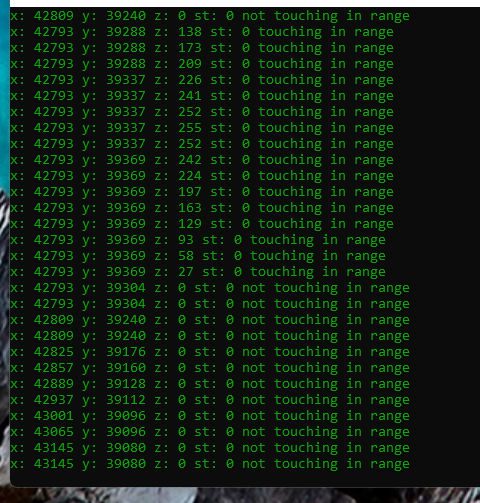
The upddutils command digitizer_events (short form de) shows the Z value for pressure devices:
Toolbar events
A program registers for events of type _EventTypeToolbar to receive toolbar events. Event callbacks follow the standard UPDD model for callbacks. Information about toolbar events is delivered to the registered callback function in the following struct:
struct _toolbar  // a toolbar area was touched
{
  int16_t htoolbar;   // toolbar handle
  int16_t row;        // row # of cell
  int16_t column;     // column # of cell
  uint8_t touching;   // true (1) if a physical touch is active
  uint8_t on;         // true (1) if the cell is "on"
                      // for a non-latched toolbar a cell is on while it is being touched
                      // a latched toolbar' cell toggles between the on & off states with each touch
}toolbar;
The general fields hDevice (the device handle the event relates to) and hStylus (the stylus number) are also relevant to toolbar events.
At the end of a toolbar touch a not-touching event is received. The report always shows the information for the last touched location, which might not be the toolbar or cell originally touched. The client software must consider and handle this appropriately. For example, if the intention is to generate an action related to the originally touched cell, this cell must be recorded and used at the time of the not-touching event. This information is identified by the key fields hDevice + hStylus + htoolbar. If the end of touch occurs outside a toolbar, the value of htoolbar is -1. This scheme provides the maximum flexibility.
Creating and configuring toolbars from the API is described in Device control from the API; the toolbar feature itself in Toolbars.
Gesture events
Gesture information is delivered via the UPDD API by UPDD Commander, which can perform system actions associated with a gesture before the gesture is posted into the operating system. UPDD Commander is available for Windows and macOS and is installed as part of the driver installation on those platforms. There is no gesture module for Linux.
UPDD Commander must be running to use the gesture API. On macOS Commander is set as a launch agent by default. On Windows Commander can be set to launch after driver installation; if it is not, enable the 'Run at startup' setting in the Commander settings dialog (see Running Commander).
The method for receiving gesture information via the UPDD API is the same as for other data types, although a couple of additional steps are required in setting up the software to build. This applies to macOS builds distributed since 23 October 2019 and Windows builds since October 2020. The two extra files, TBTouchGestureConstants.h and gestures_event.inl, are installed in the api folder alongside upddapi.h when the driver includes UPDD Commander.
// Add the following 2 lines before inclusion of upddapi.h
#define UPDD_GESTURES
#include "TBTouchGestureConstants.h"
#include "upddapi.h"

// Ensure that the files TBTouchGestureConstants.h and gestures_event.inl are both in the include path.
// Having done this, use the constant _EventTypeGesture in an appropriate call to TBApiRegisterEvent, e.g.

TBApiRegisterEvent(0, (unsigned long long)this, _EventTypeGesture, MyGestureCallback);

// Data specific to the gesture is reported in the gestureEvent member of the _PointerEvent structure
// passed to the registered callback, e.g.

void TBCALL MyGestureCallback(unsigned long long /*context*/, _PointerEvent* ev)
{
  if (ev->pe.gestureEvent.type == kTBGestureTap && ev->pe.gestureEvent.touchCount == 2)
  {
    cout << "Saw a two finger tap" << endl;
  }
}
gestures_event.inl is an optional part of the API. It is only used if you define the pre-processor macro UPDD_GESTURES, and it describes in detail the information returned for gestures in the gestureEvent member: the gesture type, the number of touches, the swipe direction, zoom and rotation amounts, drag velocity, the screen positions of up to five touches and the gesture phase. The gesture types (such as kTBGestureTap, kTBGestureDrag, kTBGesturePinchExpand) and phases are defined in TBTouchGestureConstants.h.
To stop UPDD Commander processing gestures, for example while running your own calibration program, see Disabling UPDD Commander.
For review
Gesture headers: the driver manifests ship only upddapi.h (scripts/amf_win32.manifest:40, amf_macos.manifest:47); TBTouchGestureConstants.h and gestures_event.inl come from the Commander customisations (config/v6/custom/commander-win-v7/appdir/api and commander-osx-v7/appdir/api). The text says they are installed "when the driver includes UPDD Commander" on that basis; a driver built without Commander has no gesture headers. The old example registered "_ReadDataTypeGestureEvent" (the V5 naming); the header constant is _EventTypeGesture (api/upddapi.h:112), which Commander posts (updd-commander/updd/UPDDDevice.cpp).
The old section "Disabling / enabling gestures" set a setting named "gesture enabled" (TBApiSetSettingFromInt(0, "gesture enabled", 0) or upddutils nodevice set "gesture enabled" 0). No reference to that setting exists in 07_01 or in UPDD Commander (origin/master), so it has been dropped in favour of Commander's own disable switch. Please confirm there is no API-level way to suspend Commander's gesture processing that should be documented here.
Pen attributes: the two screenshots of header excerpts (PenValues.png, zSupport.png) were dropped because they show an older field order; the struct listing above replaces them. PenFlags.png matched the current header but repeats the listing, so it was not carried. No new screenshots are needed.