Native macOS applications: the UPDDMultitouch framework
The UPDDMultitouch framework allows adding multi-touch support to macOS AppKit and SwiftUI applications. It makes the process as simple as possible by allowing any NSView or NSView-derived class that implements the UPDDMultitouchView protocol to receive multi-touch events in a similar manner to iOS.
The UPDDMultitouch framework can be downloaded from here: upddmultitouch-framework.zip
The source code for the framework, along with a basic multi-touch slider demo implemented using both AppKit and SwiftUI, can be found here: upddmultitouch-framework-and-demo-src.zip
Adding the framework to a project
To use the framework, add it to your Xcode project, and then in the "Build Phases" settings for your application target, create a new "Copy Files" phase and set it up to copy UPDDMultitouch.framework into your application's Frameworks directory:
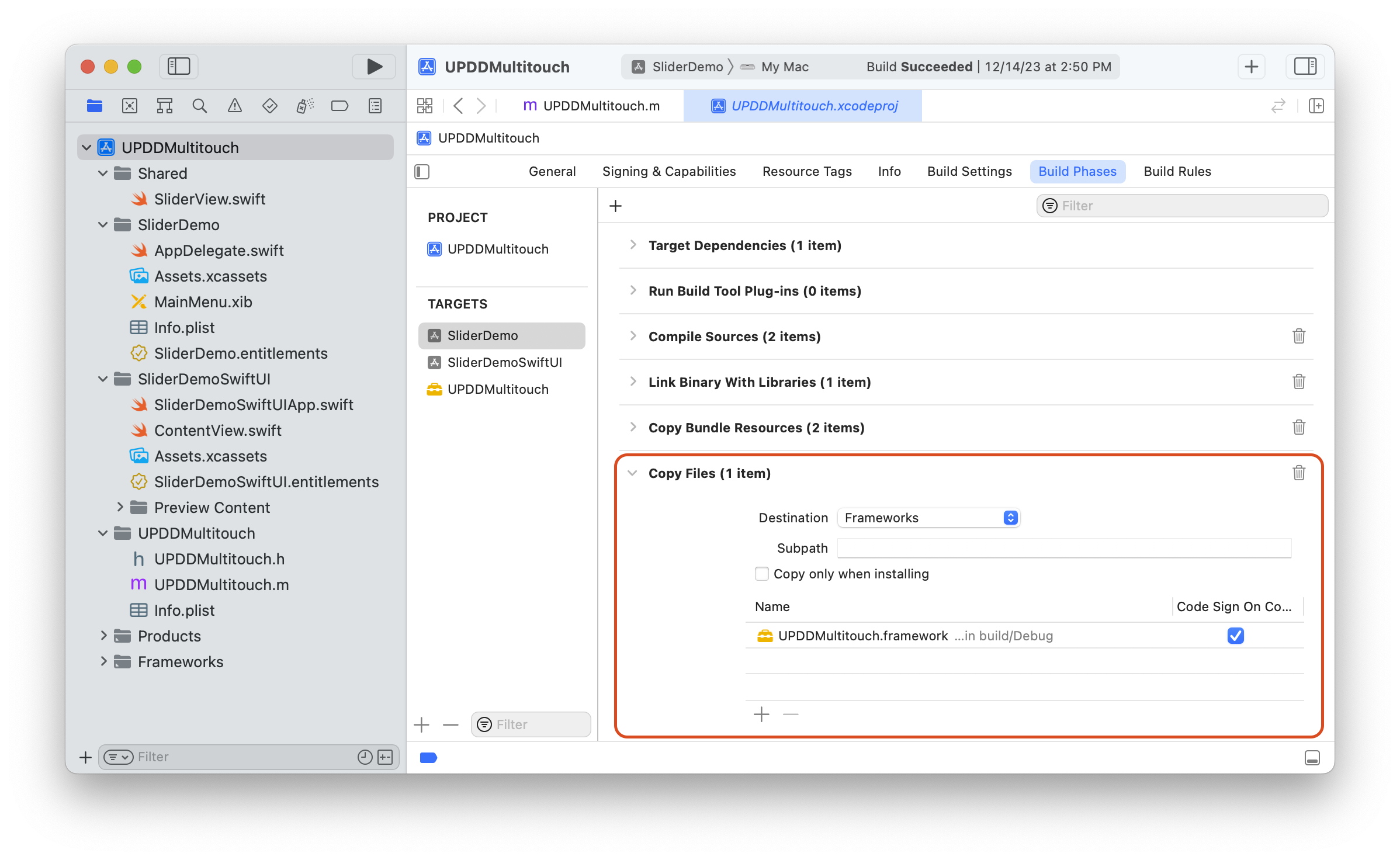
You can now import UPDDMultitouch in your source files. You must call UPDDMultitouch.initialize() when the application starts up, and UPDDMultitouch.deinitialize() when the application shuts down. We recommend calling these functions in your application delegate's applicationDidFinishLaunching and applicationWillTerminate methods.
The UPDDMultitouch class also provides setLoggingEnabled and isUPDDAvailable.
The framework uses the UPDD API, so the library validation and App Sandbox settings for API clients apply.
Receiving touches
Create a subclass of NSView, or of any NSView-derived class, that implements the UPDDMultitouchView protocol in order to receive touch events. Touch events are delegated automatically to any view that implements this protocol. The protocol requires three methods: upddTouchesBegan, upddTouchesMoved and upddTouchesEnded.
Each method has a single parameter, a set of UPDDTouch objects:
- In Objective-C:
NSSet<UPDDTouch *> * - In Swift:
Set<UPDDTouch>
UPDDTouch
UPDDTouch is designed to provide a similar interface to UITouch in iOS. It has the following properties:
| Property | Type | Description |
| deviceIdentifier | int | The unique ID of the touch device that produced the touch. |
| identifier | int | The identifier for the touch. A single touch, from the moment contact begins to when it ends, has the same identifier. The identifier is device-dependent, and the same value may be reused for subsequent touches. Simultaneous touches always have different identifiers. |
| phase | NSTouchPhase | An enum indicating the life-cycle of the touch. Possible values are NSTouchPhaseBegan, NSTouchPhaseMoved, NSTouchPhaseStationary and NSTouchPhaseEnded. |
| screenPosition | NSPoint | The position of the touch, in global co-ordinates. |
| previousScreenPosition | NSPoint | The position of the touch for the previous cycle, in global co-ordinates. |
| normalizedPosition | NSPoint | The position of the touch in normalised co-ordinates, where (0,0) is the top-left corner of the screen and (1,1) the bottom-right corner. |
| previousNormalizedPosition | NSPoint | The position of the touch for the previous cycle, in normalised co-ordinates. |
| timestamp | double | A timestamp for the touch, in seconds, relative to the system start-up time. |
| pressure | int | The raw pressure value of the touch. The range of this value is device dependent, and it is only available with pressure-enabled touch devices. |
| pressureEnabled | bool | True when the touch comes from a pressure-enabled device. |
| view | NSView | The view the touch has been dispatched to. |
UPDDTouch also has two methods:
func locationInView(view: NSView) -> NSPoint: returns the position of the touch in the local co-ordinates of the given view.func previousLocationInView(view: NSView) -> NSPoint: returns the position of the touch during the previous cycle, in the local co-ordinates of the given view.
SwiftUI applications
To add a touch-enabled view to a SwiftUI application, create a custom view implementing the UPDDMultitouchView protocol as you would with an AppKit application, and then add it into your SwiftUI content hierarchy using NSViewRepresentable. The SliderDemoSwiftUI project in the source download demonstrates how to do this.
Working with UPDD Commander
When UPDD Commander is running, configure it to pass touches within your application to the application; see API applications alongside UPDD Commander.
For review
Added from source (touchbase-apps other/macos-framework/UPDDMultitouch/UPDDMultitouch.h): the setLoggingEnabled and isUPDDAvailable class methods, and the statement that the API client entitlement notes apply. The demo's .entitlements files were not inspected; please confirm the framework needs the same library validation / sandbox settings as a direct API client. The "Working with UPDD Commander" section is added by analogy with the Qt and JUCE articles.