UPDD API overview
UPDD is much more than a conventional pointer device driver. As a pointer device driver it is responsible for moving the system pointer and emulating mouse clicks, but the driver also caters for external applications to interface with every aspect of the driver functionality, allowing applications to interface directly with the pointer device rather than be driven via mouse emulation.
This type of interface is commonly known as an Application Programming Interface (API). The UPDD API can be used to receive touch data, stylus information, pressure data, performed gestures etc. and to update driver settings and parameters directly. This document describes the API of UPDD V6 and V7 on Windows, macOS and Linux; where the two versions differ, this is stated.
The vast majority of applications are unaware of the pointer device in use and are driven by the system pointer interface as implemented by mice, pens, tablets, touch pads and touch screens. Certain specialist applications are much better suited to direct interaction with the pointer device, and these need to interface via an API. Some applications also need to change driver characteristics or settings, and the API can be used for this purpose.
The UPDD API is supported on all platforms supported by the driver and is used by the driver's own utility programs, such as the UPDD Console, UPDD Daemon, UPDD Test, UPDD Annotate, the calibration tool and UPDD Commander. It is assumed that the reader is familiar with the various functions and parameters of the driver, since that information is not duplicated here.
API topology
The connection between the API and the driver is implemented using TCP/IP. This provides an IPC (inter process communication) method that is portable to all supported operating systems.
UPDD supports client programs by way of the API interface. Client programs are UPDD supplied utilities and add-ons, such as UPDD Calibrate, UPDD Commander, UPDD Daemon and UPDD Test, or third-party applications using the API.
The basic topology is as shown below.
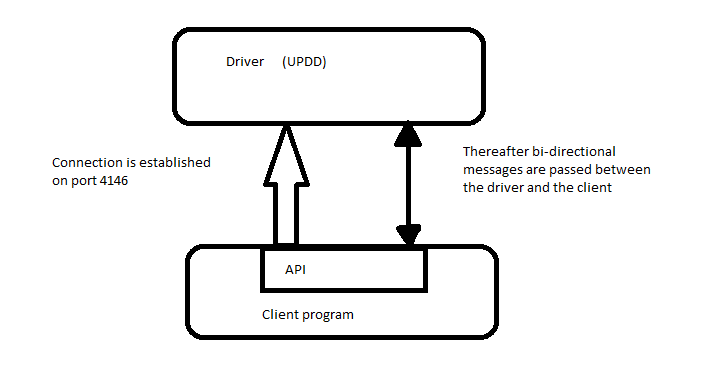
In TCP/IP terminology the driver is a server. It listens for connections from client programs on a specific port; by default this is port 4146. No special configuration is required if, as is normally the case, both the client program and the driver are on the same computer.
Multiple client programs can connect to the driver at the same time.
The TCP/IP interface also provides the basis for an advanced feature, Touch over IP.
API files
The files needed to build and link against the API, i.e. the header in all cases and the import library on Windows, are located in the api sub folder of the UPDD install folder. The run time files (the dynamic library in the table below) are held in appropriate locations for the operating system.
| OS | UPDD | Header | Import library | Dynamic library | Architecture |
| Windows | V6 | upddapi.h | upddapi.lib | upddapi.dll | 32-bit. Note 1 |
| V7 | upddapi.h | upddapi.lib | upddapi.dll | 64-bit, plus a 32-bit build. Note 2 | |
| macOS | V6 | upddapi.h | n/a | libupddapi.1.0.0.dylib | 64-bit only |
| V7 | upddapi.h | n/a | libupddapi.7.0.0.dylib | 64-bit only | |
| Linux | V6 | upddapi.h | n/a | upddapi.so | 32 and 64-bit |
| V7 | upddapi.h | n/a | libupddapi.so.7.0.0 (linked as libupddapi.so.7.0, libupddapi.so.7 and libupddapi.so) | As the installed driver |
- UPDD V6 software is mostly implemented in 32-bit code that executes in compatibility mode on 64-bit systems. Only the parts that must be 64-bit, such as some installer extensions, are in 64-bit code. Therefore the shipping V6 API is 32-bit code.
- UPDD V7 on Windows is a 64-bit installation and its API is 64-bit. For 32-bit client programs, a 32-bit build of the same V7 API (upddapi.h, upddapi.lib and upddapi.dll, with the Qt 5 libraries it needs) is installed in C:\Program Files\UPDD\v6.
The header file defines and documents all available API functions, macros and constants, and it should be the main point of reference during API development.
API file locations
Following the standard driver installation, the API files can be found in the following locations:
| OS | UPDD | Header | Import library | Dynamic library |
| Windows | V6 | C:\Program Files (x86)\UPDD\api | C:\Program Files (x86)\UPDD\api | C:\Program Files (x86)\UPDD |
| V7 | C:\Program Files\UPDD\api | C:\Program Files\UPDD\api | C:\Program Files\UPDD | |
| V7 32-bit | C:\Program Files\UPDD\v6 | C:\Program Files\UPDD\v6 | C:\Program Files\UPDD\v6 | |
| macOS | V6 and V7 | /Library/Application Support/UPDD/api | n/a | /Library/Application Support/UPDD, with links in /usr/local/lib |
| Linux | V6 | /opt/updd/api | n/a | /opt/updd/api |
| V7 | /opt/updd/api | n/a | /opt/updd/usrlib |
On macOS the V7 library /Library/Application Support/UPDD/libupddapi.7.0.0.dylib is linked as /usr/local/lib/libupddapi.7.0.0.dylib, libupddapi.7.0.dylib and libupddapi.7.dylib. Building a client on macOS is described in Building API clients on macOS.
Version binding
upddapi.dll / .so / .dylib is tightly linked to a specific version of the driver. You must use the version installed with the driver.
One simple way to achieve this under Windows is to launch your application with the current working directory set to the folder that holds upddapi.dll (C:\Program Files\UPDD for V7). This avoids making a copy of the file and thus avoids the risk of using an incorrect copy. Under Linux and macOS creating a symbolic link to the installed library is recommended.
UPDD client applications are guaranteed to work with the same or newer versions of the driver but cannot be guaranteed to work with older versions. The version 6 API is not compatible with the version 5 API.
TBApiOpen will fail if the API version is incompatible with the calling client application. TBApiGetLastError can be used to get additional information regarding any API error.
The comms layer used by the API has a compatibility check: the client and server each set a "schema" level and comms can only be initiated if these are equal. If the software changes so that the API is no longer compatible, this level is incremented.
As a general rule, the API is tightly bound to a version of the driver and the version number of the API must match that of the driver. In practice there is some leeway, depending on the nature of any API changes. The backward compatibility is at the interface level, meaning that a program built against a certain version of the API should work with newer versions of the API without recompilation.
Qt application considerations
The UPDD API uses Qt and, because the API must by definition share a process space with the client application, there are certain considerations when using a Qt client application with the UPDD API:
- TBApiOpen must be called after QCoreApplication (or a derived object such as QApplication) is created.
- The client program must, if possible, be built against the same major Qt version as the API: Qt 6 for the UPDD V7 API; Qt 5 for the UPDD V6 API and for the 32-bit build of the V7 API in C:\Program Files\UPDD\v6 on Windows.
- The client must use the Qt binaries from the same Qt version. It is recommended that the client application uses the Qt binaries installed by the driver.
TBApiIsDriverConnected dispatches Qt events, so in a Qt application it should only be used before any signal / slot connections are made. After that, use TBApiIsDriverConnectedNoDispatch, which is functionally identical but safe to use in a Qt application at any time. Non-Qt applications are not subject to this limitation.
macOS: linking a private copy of the V6 API to your Qt
As an alternative to rule 3 above, a Qt client application using the UPDD V6 API on macOS can patch a private copy of the API to link with your own Qt installation. The UPDD V6 API, libupddapi.1.0.0.dylib, is built with Qt 5.
- Take a private copy of libupddapi.1.0.0.dylib and place it in a location where your application will reference it in preference to the installed copy.
- Execute the following commands, where libupddapi.1.0.0.dylib is the private copy of the API:
install_name_tool -change @rpath/QtWidgets.framework/Versions/5/QtWidgets <path to your qt version>/clang_64/lib/QtWidgets.framework/Versions/5/QtWidgets libupddapi.1.0.0.dylib
install_name_tool -change @rpath/QtCore.framework/Versions/5/QtCore <path to your qt version>/clang_64/lib/QtCore.framework/Versions/5/QtCore libupddapi.1.0.0.dylib
install_name_tool -change @rpath/QtSql.framework/Versions/5/QtSql <path to your qt version>/clang_64/lib/QtSql.framework/Versions/5/QtSql libupddapi.1.0.0.dylib
install_name_tool -change @rpath/QtGui.framework/Versions/5/QtGui <path to your qt version>/clang_64/lib/QtGui.framework/Versions/5/QtGui libupddapi.1.0.0.dylib
install_name_tool -change @rpath/QtXml.framework/Versions/5/QtXml <path to your qt version>/clang_64/lib/QtXml.framework/Versions/5/QtXml libupddapi.1.0.0.dylib
install_name_tool -change @rpath/QtNetwork.framework/Versions/5/QtNetwork <path to your qt version>/clang_64/lib/QtNetwork.framework/Versions/5/QtNetwork libupddapi.1.0.0.dylib
API topics
To use the API you will need to know the files involved, how to integrate with the driver, the API function calls and the driver settings that may be affected by the API. These are covered in the following topics:
- Connecting to the driver and receiving events, including the console mode example program
- API event reference
- Settings API
- Device control from the API: calibration, toolbars, HID feature requests and data injection
- API example programs
- Building API clients on macOS
- API applications alongside UPDD Commander
- API changes from UPDD 6 to UPDD 7
For review
Linux V7 header location: the package manifest places upddapi.h in its api target (scripts/amf_linux.manifest:44) and the install folder is /opt/updd (scripts/unix_install/install:6), so /opt/updd/api is given above, but the final on-disk path was not traced through the packaging. Please confirm on a V7 Linux installation.
The topology image is the V6 diagram (port 4146, unchanged in V7: api/amf.cpp:62). The old "Note 2" said the V6 API is installed in \v6; the manifest (scripts/amf_win32.manifest:44-46) shows it is a 32-bit build of the V7 API, and the text now says so.