Screen zoom
Desktop zooming can be used to magnify the desktop to aid in viewing and interacting with a display. It works similarly to the Smart Magnifier feature, but applies to the entire display. This document describes the screen zoom actions of UPDD Commander and their settings; they are available on macOS and Windows.
Screen zoom actions
Zooming is controlled with three gesture actions:
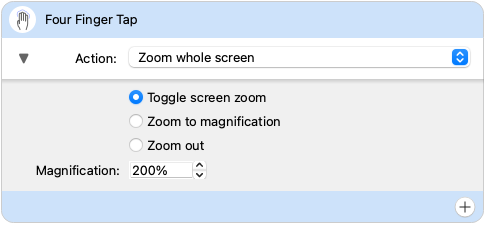
Zoom whole screen: toggles screen zooming on and off, zooming in to the specified magnification level when activated, and zooming out all the way when deactivated. It can optionally be set to always zoom in ("Zoom to magnification") or always zoom out. It can be assigned to any gesture, though one of the tap gestures is recommended.
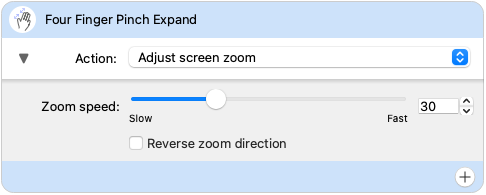
Adjust screen zoom: zooms the screen in and out continuously while the gesture is performed. It works most intuitively with one of the pinch / expand gestures, but can also be used with a swipe or rotate gesture. Its settings are the zoom speed and "Reverse zoom direction".
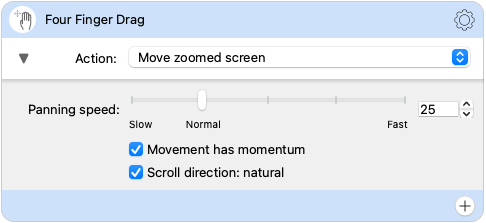
Move zoomed screen: pans around the screen when it is zoomed in, allowing you to control which part of the screen is visible. It can be assigned to any drag or press gesture. Its settings are the panning speed, whether movement has momentum, and natural scroll direction. This action has no effect when the screen is not zoomed in.
It is not necessary to assign all of these actions to gestures in order to use desktop zooming; you can use just "Zoom whole screen" or "Adjust screen zoom" if you prefer, though the feature is most useful when all three are used.
The names of these and the other zoom actions were changed in UPDD Commander 1.14.0, which also added "Zoom whole screen" and "Move zoomed screen"; see Gestures and actions.
macOS Accessibility zoom
Earlier versions of UPDD Commander used macOS's built-in Accessibility zoom feature, but later versions use their own feature, so it is no longer necessary to change any System Settings in order to use screen zooming. UPDD Commander is not fully compatible with macOS's Accessibility Zoom feature, and it is strongly recommended to use UPDD Commander's own screen zoom actions to zoom the screen in and out instead.
For review
50770 said holding Shift while zooming or panning the screen slows it down for fine adjustment. That code is only in macOS/osxZoomScreen.mm (the old Accessibility-zoom implementation), which released 1.15.0 does not call; the current zoom and pan (commonActions.cpp zoomScreen / panScreen) have no Shift handling. Left out pending a test on 1.15.0.
Action settings (zoom to magnification %, zoom speed, panning speed, momentum, natural direction) are from widgets/actionSettings/QtToggleScreenZoomSettingsWidget.ui, QtZoomScreenSettingsWidget.ui and QtPanScreenSettingsWidget.ui; Windows availability from the Windows action menu in gesture-metadata.json. The Accessibility Zoom compatibility sentence is from change history 1.11.0.