Presets
UPDD Commander ships with a number of pre-defined gesture and action sets, known as presets, that can be added to the active application list as required. This document describes where presets are kept, the preset categories, the presets supplied and how to create your own. It applies to UPDD Commander on macOS and Windows.
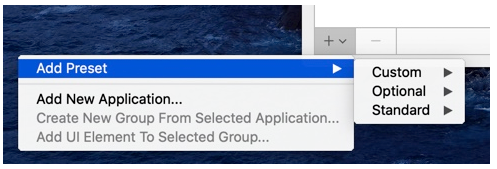
The preset items exist to allow you to:
- reset a predefined application that you may have modified back to its original settings
- switch the functionality of a number of the predefined applications
- add an application with a custom configuration
Preset folders
The preset list is created from the commander preset folder structure held in the UPDD application folder:
| OS | Folder |
| macOS | /Library/Application Support/UPDD/commander presets |
| Windows, UPDD V6 | C:\Program Files (x86)\UPDD\commander presets |
| Windows, UPDD V7 | C:\Program Files\UPDD\commander presets |
Presets are also read from a folder in the user's own settings location: ~/Library/Application Support/UPDD Commander/commander presets on macOS and %APPDATA%\Touch-Base Ltd\UPDD Commander\commander presets on Windows. In both locations, gesture presets are held in the "touch" sub-folder, as .ucapp files in the category sub-folders described below.
Preset categories
The presets are held in separate lists, shown in the preset menu:
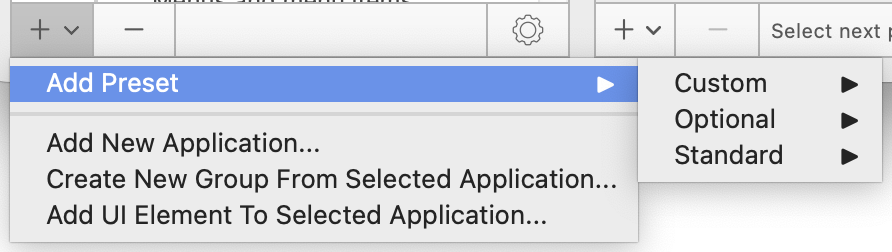
| Category | Description |
| Standard | The standard, default list of applications and application groups, gestures and actions defined in the application list when Commander is first started. |
| Optional | Optional, alternative configurations for some of the standard entries. |
| Custom | Known applications with predefined gesture and action configurations. These are automatically added to the application list if the application is found to be installed on the system. |
Hovering over a preset describes the configuration change, as for the Studio One digital audio workstation preset:

Selecting a preset for an entry that is already in the application list replaces the existing entry.
Automatic adding of Custom presets for installed applications can be turned off with global setting upddcommander.applicationsettings.disable_add_presets_for_installed_apps, and the presets can be hidden from the application list with upddcommander.applicationsettings.hide_default_presets, see Commander settings reference.
Supplied presets
This table clarifies the use of the various presets:
| Group | Preset | Description |
| Standard | The default set of applications defined in the application list when Commander is first invoked. | |
| Default Gestures - full gesture set | Default set of gestures and actions to mimic multi-touch trackpad usage. | |
| Browsers (iOS) | Configures the browsers to emulate iOS mode of operation: single finger drag performs the scroll action. See Browsers. | |
| Dock | Configures gestures that work with the Dock, even when its magnification is enabled. See Dock, Notification Centre and widgets. | |
| Finder | Defines one finger gestures and actions required by Finder (selecting and dragging icons on the desktop), irrespective of how Default Gestures is configured. | |
| Maps | Defines gestures and actions required to control Maps (two finger rotate and pinch to rotate and zoom the map). | |
| Notification Center | Defines gestures and actions required to invoke and control the Notification Center. | |
| UPDD Test | Adds TUIO to the UPDD Test application so that touches received via TUIO can be viewed when Test is running as a TUIO client application. | |
| Optional | Alternative configurations for some of the standard application sets. | |
| Default Gestures - Simple touch | Implements a system-wide single touch mode, see Simple touch only. | |
| Default Gestures - TUIO | Converts all touches to TUIO touches, except touches that occur within applications that are configured with their own gestures. Commander acts as a TUIO server. | |
| Browsers (TUIO) | Configures the browser web content to receive touch via TUIO. Needed to work with the UPDD TUIO bridge extension and cater for multi-touch browser applications. | |
| Browsers (macOS) | Standard trackpad type browser interaction: single finger drag performs the click and drag action. | |
| Custom | Custom applications, added as required. | |
| DAW | Live, Studio One, Yeco, Logic Pro, Pro Tools | Presets for digital audio workstations, described in DAW applications. |
| General | Flexi-deck | Defines gestures required to interact with the Flexi-deck on-screen menus: two finger pinch and expand to resize menus, two finger drag to move menus, two finger tap to generate a right click (button macros can be associated with single and double left and right click).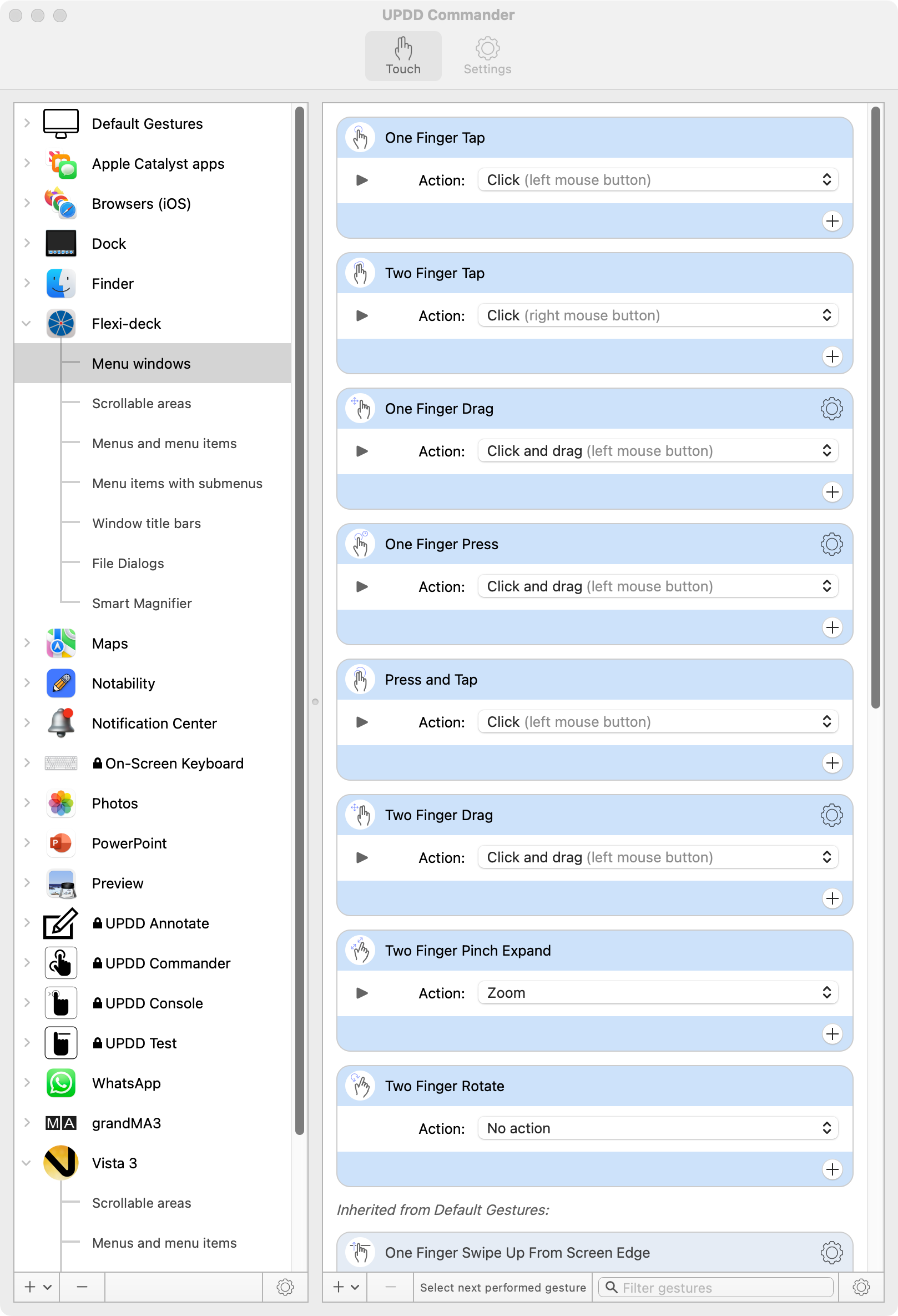 |
| PowerPoint | Defines one finger swipe left and right as left and right keystrokes, so that swipes can be used to move back and forth in presentation mode. |
Notes on other applications with presets are in Notes on other applications.
Creating your own presets
Any application or group in the application list can be saved as a preset file. Select File > Export Application... to save one application or group as a .ucapp file, or hold down the Option (macOS) / Alt (Windows) key and select File > "Export All Touch Gestures To Presets..." to save every application and group as its own .ucapp file, as described in Running Commander. A .ucapp file can be imported with File > Import Application Settings..., or placed in the "touch" folder of a preset folder listed above so that it appears in the preset menu.
If you find a common application that works better with a custom configuration, raise a ticket at https://www.touch-base.com/contact so that it can be considered for inclusion in the supplied presets.
For review
E7 resolved: 50689 described "All Applications - TUIO" as "Set UC to run as a TUIO client". The preset file (E:\d_drive\config\v6\custom\commander_preset-ExtraApps-osx\appdir\commander presets\touch\Optional\Default TUIO.ucapp; Windows equivalent "All Applications TUIO only.ucapp") has gestureType=tuio on all applications and the description "All touches are converted to TUIO touches, aside from for touches that occur within applications that are configured with their own gestures": Commander is the TUIO server. Corrected accordingly.
The supplied-presets table follows 50689 (with All Applications renamed Default Gestures). The current macOS package in E:\d_drive\config also contains Standard presets Apple Apps, On-Screen Keyboard, Photos, Preview, UPDD Annotate, UPDD Commander, UPDD Console, WhatsApp, and Custom presets grandMA3, Microsoft Remote Desktop, Mixing Station, Notability, OneNote, open-stage-control, Plex, Simulator, Swinsian, Vista 3, Affinity Photo, Photoshop CC, SMART Notebook, SMART Ink Document Viewer, LUNA and Studio Pro. Windows packages carry "All Applications + Trackpad + Smart Magnifier", "All Applications (TP Only)", "All Applications TUIO only", mspaint, Photoshop and UPDD Test. Please confirm which packages standard builds include before the table is extended.
The user preset folder (PresetManager.cpp:163-181) and "place a .ucapp in the touch folder to have it appear in the preset menu" are from 1.15.0 source, not from the old articles; please confirm the second part on a test system. The Dock, Browsers and DAW detail of 50689 (Dock show/hide behaviour, browser group editing, DAW sliders, Pro Tools scrolling, ProTools undo issue) is left to the Dock, Browsers and DAW topics.