Building API clients on macOS
This document collects the points to consider when building a UPDD API client application on macOS with Xcode, for UPDD V6 and V7. The API files themselves are listed in the UPDD API overview.
Xcode project settings
To make an app that uses the UPDD API:
- Add the following path to your project's "Header Search Paths" setting:
/Library/Application Support/UPDD/api/ - Add the API library to the "Link Binary With Libraries" section of your project's Build Phases: for UPDD V7,
/usr/local/lib/libupddapi.7.dylib(a link to /Library/Application Support/UPDD/libupddapi.7.0.0.dylib); for UPDD V6,/usr/local/lib/libupddapi.1.dylib.
You should then be able to include upddapi.h, and your project should link successfully.
Objective-C and Swift
The API is implemented as a standard dylib, so it can be used from an Objective-C program. The header file is written in standard C and as such might need tweaking for Objective-C. The simplest approach is to include it and then remove any items that fail compilation. In the event that a removed item is required, it can be reinstated and adapted as necessary. This is likely to be more efficient than trying to convert the whole header, unless there are very few failing entries.
For AppKit and SwiftUI applications that only need multi-touch events, the UPDDMultitouch framework wraps the API for you.
Cocoa touch and gesture events
It is not possible for all touch-related events to be passed into Cocoa apps. This is partly because macOS does not have a way of representing touch events that have an absolute position and originate from a touch screen; all touch events are assumed to come from a trackpad. The NSResponder touch methods (touchesBeganWithEvent:, touchesMovedWithEvent:, touchesEndedWithEvent:, touchesCancelledWithEvent:) are therefore not called for touch screen touches.
Gesture events such as magnifyWithEvent:, rotateWithEvent:, swipeWithEvent:, beginGestureWithEvent:, endGestureWithEvent: and smartMagnifyWithEvent: can be received when UPDD Commander performs gestures as the corresponding system actions. If you need individual touch positions, use the UPDD API and register a callback function with TBApiRegisterEvent; the UPDD Test source demonstrates how to use the UPDD API for receiving both touch and gesture events. Gesture events can also be received from UPDD Commander through the API; see Gesture events.
macOS has no system gesture for a one finger swipe. If you prefer not to use the UPDD API, a one finger drag can be mapped in UPDD Commander to a scroll action and read by listening for scroll wheel events or by using the swipe tracking API (wantsScrollEventsForSwipeTrackingOnAxis: and trackSwipeEventWithOptions:dampenAmountThresholdMin:max:usingHandler:), or mapped to a click and drag action and read as mouse events.
Library validation
When running a UPDD client application you may see the following or a similar error relating to the use of the UPDD libraries:
/usr/local/lib/libupddapi.1.0.0.dylib: code signature in (/usr/local/lib/libupddapi.1.0.0.dylib) not valid for use in process using Library Validation: mapping process has no Team ID and is not a platform binary
(With UPDD V7 the library named is libupddapi.7.0.0.dylib.)
This is the "library validation" security feature, which requires all third-party libraries used by an app to be signed with the same team ID as the application itself (each Apple developer account has one team ID). The UPDD library is signed with Touch-Base's team ID; your app will be signed with your team ID or, as the error indicates, not signed with any team ID at all. Apple enabled this feature by default starting with Xcode 11.
There are two ways to handle this:
- Re-sign the UPDD library using your own certificate so that the team IDs match.
- Disable this security requirement in your app, as described here: https://developer.apple.com/documentation/bundleresources/entitlements/com_apple_security_cs_disable-library-validation. With Hardened Runtime enabled, this is the runtime exception "Disable Library Validation".
We recommend option 2, as it is the simplest option and is the intended course for software that uses third-party libraries.
App Sandbox
If App Sandbox is enabled in a project, both "Incoming Connections (Server)" and "Outgoing Connections (Client)" should be enabled in the "Signing & Capabilities" settings of the project. The API is prevented from working unless these are enabled, because it connects to the driver over TCP/IP.
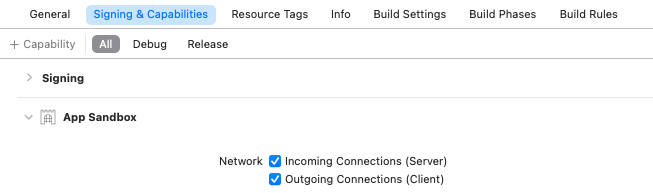
For review
App Sandbox: this page (from the old App Sandbox article) asks for both incoming and outgoing connections; the JUCE article asks only for "Outgoing Connections (Client)". The API is a TCP client of the driver (port 4146), which suggests outgoing is enough. Please confirm and drop the incoming entitlement if it is not needed.
Cocoa gesture events: the source exchange (2018) was with UPDD Gestures, which set swipe gestures to "Navigate between pages" to create system-wide swipe events. The text now names UPDD Commander's actions in general terms; please confirm which Commander actions produce magnify / rotate / swipe NSEvents. The developer/response transcript has been condensed to its findings; the UPDD Gestures specific settings were not carried.