Known hardware issues
Our driver works with many touch screens, digitisers, pens and whiteboard type devices, on Windows, macOS and Linux, in many system configurations and environments. This document lists the known issues and configuration considerations for particular hardware.
Which touch devices are supported
We are often asked which devices the driver supports, or whether we can recommend a touch monitor; more often than not for a macOS system, which does not support multi-touch devices unless our driver is installed.
The simple answer is that we are likely to support most touch screen devices currently available to purchase, or can very easily add support if a device is not yet supported, so select one that suits your needs on price, size, aesthetics and so on. We do not recommend a specific touch monitor, because new ones are being released all the time. We always recommend you purchase on a sale or return basis, if possible, in case there are any issues supporting the device.
The current list of supported touch monitors can be seen on our download page: look for the Monitor / Touch device list. Remember that the support is actually for the touch screen used on the monitor, and the same monitor model can use a selection of touch screens.
The driver has mainly been developed to support touch-like devices used on top of the video display, where the stylus contact and movement apply to the 'absolute' position of the contact, rather than the 'relative' position that applies to devices not directly related to the display, such as mice and trackpads: touch monitors, pens used on video devices, whiteboards and so on. It supports modern plug-and-play HID compatible USB devices, and also a number of old serial devices and old legacy (non-HID) USB devices. The old devices need to be configured manually in our software, and many are; we just need to know the device in use to advise whether it is already supported or what information we need to add support.
Modern touch devices are configured automatically from the HID Report Descriptor held in the device, so they can generally be supported with very little configuration. When a USB touch device is plugged in it is recognised by its USB vendor and product id, and the system looks for a driver registered for the device; for our driver to support it, it must register the correct vendor and product id. We have hundreds of these devices preconfigured and available as described in Downloading UPDD, and you can also request a driver for a HID touch device connected to your system. The vendor and product id are easily found when the device is plugged in: see Identifying a touch device.
Some multi-touch devices switch to a single touch mode when they are not plugged into a Windows system; see Multi-touch device stuck in single-touch mode.
General issues
| Issue | Notes |
| Delta mode devices | Controllers that do not send co-ordinates while a touch is held steady. The device's lift-off time should be disabled and calibration needs touches of more than 750 ms; see Delta mode devices. Known controllers: Elo Touchsystems SmartSet 2216 (USB); Chengying IR touch (USB, Zaagtech). |
| Multi-touch devices on systems other than Windows | Some multi-touch touch screens switch to a single touch 'mouse' mode when they are not plugged into a Windows system. See Multi-touch device stuck in single-touch mode. |
| USB stalls | Some devices stall when they are initialised and may need the initialisation requests to be disabled. See USB initialisation settings and stalls. |
Devices that stop responding on macOS
A few modern touch screens that worked with our driver in early macOS releases fail to work from macOS 10.15 because of an incompatibility with the low level USB interface of these later versions. The interaction between macOS and the device stalls the touch device so that it does not send any data when touched; the log shows 'Error from async read: device not responding (IOReturn = 0xe00002ed)' and a disconnect notification is issued when the screen is touched. What to try is described in macOS: device not responding (0xe00002ed). The devices we know of are:
| Device | Notes |
| ASUS BE24ECSBT (USB, 424F) | Does not work on macOS 10.15 and above. |
| Dell P2314T | This monitor uses two different touch screens, one from Ilitek and one from Weida. The Weida version works and is used on the vast majority of these monitors. |
| Dell P2424HT (USB, 1FD2) | Addressed by Dell with a firmware update (version 7.7) of the touch chip. |
| HP E24t G5 (USB, 29BD) | SiW / BOE touch chip, see below. |
| iiyama T2754MSC (USB, 1FD2:9101) | Affected on macOS 10.15 and above. |
| Viewsonic TD2455 | This monitor uses two different touch screens, one from BOE and one from LG. The LG version works. The BOE version (USB, 424F) needs a firmware update, available from Viewsonic as a Windows tool. |
| WIMAXIT Portable Touch Monitor 14.0 (USB, 1FD2:8012) | Affected on macOS 10.15 and above. |
SiW / BOE manufacturer chips are used in touch screens. These chips contain firmware that interacts with the host operating system at a low level. One such chip, used in USB devices with vendor id 29BD, product id 9302 and vendor id 424F, product id 9301, gives the low level USB error 'device not responding (0xe00002ed)' on macOS when touched; to the user, touch just does not work. See macOS: device not responding (0xe00002ed).
Hardware specific issues
| Device | Notes |
| Baanto, optical | Can be placed in a Mac mode, which our driver does not support. See Multi-touch device stuck in single-touch mode. |
| Cocopar Y156UH7R | The monitor's on-screen menu has a MAC option that runs the touch screen in single touch mode. See Multi-touch device stuck in single-touch mode. |
| CVTE | We embed HID Report Descriptors for the CVTE touch devices that output 38 and 62 byte touch packets, but not for a 64 byte device, so the standard CVTE driver does not work with it. Ideally we would like a HID Report Descriptor extracted from a Windows system for this device; in the meantime a modified driver with manual HID definitions that does work is available on request. |
| DMC DUS serial | This controller may need the heartbeat set to keep the device alive (see Serial (RS232) devices):upddutils set rs232.macro.keepalive.ms 2000upddutils set rs232.macro.keepalive "02 4C 02 04 00 02 4C 02 81 01"After setting these values, restart the driver or reboot the system. We can supply software with these settings preset if required. |
| eGalax, old single touch (0EEF/0001) | Comes in a number of flavours, both HID and non-HID compatible. HID compatible devices work automatically with UPDD. For non-HID devices we pre-configure the device, and there are three configurations: one with a 5 byte touch data packet and two different 6 byte versions. It is important that the correct one is supplied when a non-HID device is in use. |
| ELO APR 7000 series | Not supported by our drivers (USB vendor / product id 4E7/71, 73, 74). We do support the APR 7010 series 4E7/7A device. |
| ELO 2515 iTouch Plus, USB | Not a HID compatible device; it needs a special driver from ELO to support multi-touch on Windows. With UPDD only single touch is supported. The controller was superseded by the 2521 iTouch Plus, which offers full multi-touch with UPDD. |
| iiyama TF6537UHSC-B1AG | We encountered this device twice on macOS with UPDD V6. Once it showed USB hardware errors when plugged into the Mac. On the other occasion single touch worked with the native HID driver, but as soon as UPDD was loaded and asked the device to enter multi-touch mode, the device sent no touch data. UPDD V6 did not support this device. |
| iiyama T2754MSC | On later macOS versions the touch screen of this monitor refuses to send touch data; customers on 10.14 are OK. We believe that whatever macOS sends to the device when requesting its information disables the touch interface, whether deliberately or through a bug in the touch screen's firmware. By the time macOS hands the device to our driver it is already in this non-working state. |
| Pisichen, 16 inch | Runs in single touch mode on macOS and ignores all USB requests to switch back to multi-touch mode. See Multi-touch device stuck in single-touch mode. |
| PQ Labs | PQ Labs have various touch screen products, starting at G3 and, at the time of writing (May 2018), shipping G9. Some early versions are not HID compatible and need PQ Labs' own driver; PQ Labs never shared the touch data format of these devices, so we can only support the HID compatible versions, which we believe to be G5 and above. Non-HID and HID versions can share the same USB vendor and product id, so it is difficult to tell them apart; when a device does not work we can capture touch data to confirm whether it is a non-HID device. Some PQ Labs devices can run in both non-HID and HID mode. A customer using UPDD for multi-touch on macOS reported touch was not working. Our diagnostics showed the device registered as USB device 1EF1/0001 and the captured data was non-HID; rebooting did not change this. Physically unplugging and replugging the device switched it to HID mode, USB device 1EF1/0057 (presenting a different HID descriptor), and touch worked in multi-touch mode. We are unsure why a reboot did not give the same result, as our driver issues the same USB requests in both cases. These are the files captured by our diagnostics, showing the switch from the 0001 to the 0057 device: 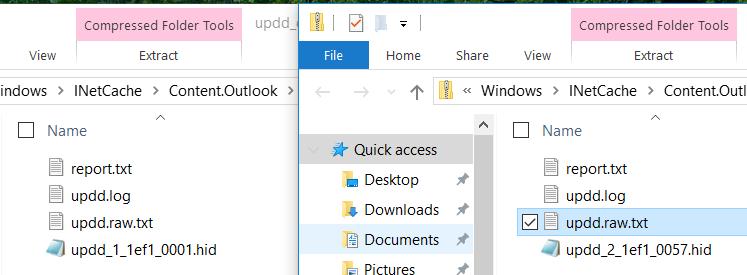 |
| Samsung Flip 2 WM85R | The display has its own operating system with whiteboard functionality, and external sources run in windows on top of it; an external system such as macOS starts its own window in full screen mode, with the display's touch-out port connected to that system. Users report that when an external video source (e.g. HDMI) runs in full screen mode, the display's on-screen menu must be enabled for touch to reach the external system. The menu shows for a few seconds when the display starts and then hides; you can re-enable it and it stays until disabled, and it can be dragged to a corner and reduced in size. A user also reports that if the external video (picture in picture) is not full screen the touch-out port works, and if it is full screen external touch does not work. |
| Sharp devices | The old UPDD V5 driver worked well with these devices but V6 was intermittent. These USB initialisation settings seemed to be the best combination:disable_get_max_contacts: 1disable_remote_wakeup: 0disable_set_alt0: 1disable_set_device_mode: 1 |
| Slate Digital Raven | To connect an additional touch monitor you need a custom driver from us that supports both the Slate touch screen and the touch screen of your monitor; see Specialist builds. In the Raven software, select the 'Dual' mode option during Raven start-up, in the same dialog where you select the DAW. |
| Surface Hub 2 | Used as an external monitor, the Surface Hub 2 is reported to send touch back through USB only when the Windows Teams OS 'Connect' application is active and in the foreground, not when using HDMI and USB or USB-C (contrary to its documentation). |
| SiW / BOE touch chip controllers | See Devices that stop responding on macOS above. |
| Wing Cool Touch (27C0) | Some devices with the 859 chip stay in single touch mode. See Multi-touch device stuck in single-touch mode. |
| Zaagtech / Chengying | Some multi-touch devices switch to single touch mouse mode on macOS and will not switch back; in that mode they are also delta mode devices. See Multi-touch device stuck in single-touch mode. |
For review
- The three 0xe00002ed device lists (50231 SiW/BOE, 50530, 50799) are merged here (review E22). 50799 belongs to macos-device-not-responding (troubleshooting-b), which links here; its iiyama T2754MSC (1FD2:9101) and WIMAXIT 14.0 (1FD2:8012) rows were added in the reconciliation. 50799 gave no detail for them beyond the macOS 10.15 onset. The wording follows the support practice that this is a firmware/macOS compatibility issue, not a hardware fault (review E14).
- Dropped the Multitou.ch MultiTaction row: it depended on the withdrawn UPDD Gestures software receiving TUIO and a 'dummy' driver. If Commander's TUIO client mode does the same job, a new row is wanted (see commander-tuio).
- Dropped the two download-page screenshots of 50530 (MonitorList.PNG, DriverDownload.PNG); the download page is not documented here.
- The iiyama TF6537 row is dated to UPDD V6 ('Currently UPDD v6 does not support this device'); has it been tried with V7 and the 7.1.230 HID reader? The Sharp row is likewise V6 experience.
- 50231 wrote 'UPDD V6' throughout; reworded to UPDD except where the statement is V6 experience.