macOS: UPDD processes not running
UPDD driver and utility functions rely on various processes being active. If any of the main processes is not running, the associated function does not work.
UPDD (the driver) runs as a launch daemon, and UPDD Daemon and UPDD Commander run as launch agents, so that should one fail for any reason it is started again automatically. This document describes what to do when they are not running.
Disabled processes
In normal operation UPDD Daemon and UPDD Commander each have a menu bar icon (which can be disabled if required):

If the icons are expected but missing, the process is not running. We have investigated a number of reports of missing icons and found that the process had been disabled:

As far as we know, these processes can only become disabled at a user's request, or when another application or the system disables them. On one customer's system something had disabled many launch agents and launch daemons, including the UPDD ones; an application called CleanMyMac was installed and may have been the cause.
On macOS 13 and above, also check that the Touch-Base background item is allowed to run (see Background items).
Enabling the processes
Either uninstall and reinstall the software, or re-enable the jobs with the launchctl command and its -w option, in a terminal window:
| Process | Command |
| UPDD (driver) | sudo launchctl load -w /Library/LaunchDaemons/com.touch-base.updd.plist |
| UPDD Daemon | launchctl load -w /Library/LaunchAgents/com.touch-base.updddaemon.plist |
| UPDD Commander | launchctl load -w /Library/LaunchAgents/com.touch-base.upddcommander.plist |
This re-enables the launchd job, starts the process and sets it to start automatically. To stop the driver: sudo launchctl unload /Library/LaunchDaemons/com.touch-base.updd.plist
The processes can also be started and stopped with the upddprocesses command.
Viewing the services
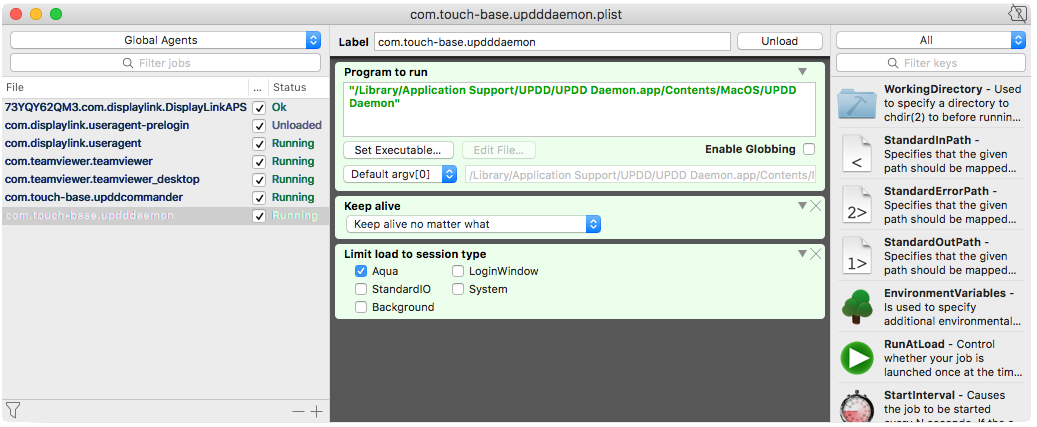
A GUI application called LaunchControl is available to view system and user services:
For review
launchctl load -wis a legacy subcommand on current macOS. Confirm it still re-enables a disabled job on macOS 15/26, or replace it withlaunchctl enablepluslaunchctl bootstrap.- 50695's commands for the two withdrawn applications (com.touch-base.upddgestures and com.touch-base.upddtuio) are left out, as is its 'we intend to add an option to upddprocesses' line. Does upddprocesses now re-enable disabled jobs? If so, say so.