What is in a diagnostics package
The diagnostics file, updd_diagnostics.zip, created by the UPDD diagnostics procedure contains the information we use to investigate a reported issue. This document describes its contents for UPDD V7 on Windows, macOS and Linux, and how the HID Report Descriptor held in it is interpreted.
Files in the package
| File | Contains |
| report.txt | Operating system and kernel version, host name and the time the diagnostic was taken, followed by the output of a series of UPDD commands (see below): the USB and HID devices seen by the driver, the installed and supported devices, monitor layout, driver version, global settings and device settings. |
| updd.raw.txt | The touch data captured while you drew on the screen. It can of course be empty if the device is not working. |
| updd_n_vid_pid.hid | For each USB HID device, the HID Report Descriptor extracted from the device in 'uninterpreted' form (n is the UPDD device number). If the descriptor in use comes from the device's UPDD settings rather than from the device, the file is named …_override.hid and the device's own descriptor is written beside it as …_device.hid. I2C devices give updd_i2c_id.hid. |
| logs folder | Every log file from the UPDD log folder: updd.log (the driver log) and its rotated copies, and the logs of API client programs (on macOS also those in the user's ~/Library/Preferences/updd/log). On Windows also setupapi.dev.log and devices.dvx (the Windows device list); on macOS also ioreg.log and system_profiler_usb.log and, for drivers below 7.1.230, system extension.log (see below). |
| dumps folder | Crash dumps and reports for UPDD components: minidumps on Windows, DiagnosticReports (.ips, with a .crash conversion) on macOS. See Crash logs and dumps. |
| updd-calibrate-*.raw.txt | Windows only: touch data captured during calibration, if any. |
Sections of report.txt
Each section of report.txt is headed by the command whose output it holds:
| Section | Contains |
| usbdevices | USB devices attached to the system, as seen by the driver. |
| hiddevices | Windows and macOS: HID devices claimed by UPDD. |
| launchagents, launchdaemons, systemextensions | macOS only: the Touch-Base launchd jobs for the user and for root, and the output of systemextensionsctl list. |
| recordraw | The status of the touch data capture. |
| devices | Supported devices discovered by UPDD, with OK, NOK or DISABLED and the monitor each is assigned to. |
| pnpinfo | All devices supported by the installed driver. |
| monitors | The monitor layout. |
| version | The driver version. |
| global get * | The global settings. |
| device n get * | The settings of each device. |
| device n diag dumphid | The result of the HID Report Descriptor dump for each device. |
System extension load log
Drivers below 7.1.230 install a system extension on macOS 10.15 and above. This extension must be allowed manually in the macOS settings, as described in macOS: allowing the UPDD driver extension. From 7.1.230 a package for HID devices ships no extension, so there is no extension log and nothing to allow.
The system extension.log, held in the logs folder, shows the load status of the extension:
| Awaiting approval | Activated |
| 2021-06-16 20:05:55 +0000 - UPDD System Extension application has started 2021-06-16 20:05:55 +0000 - Activating DriverKit extension... 2021-06-16 20:05:55 +0000 - ...submitted activation request 2021-06-16 20:05:55 +0000 - Request needs user approval... | 2021-06-15 20:55:52 +0000 - UPDD System Extension application has started 2021-06-15 20:55:52 +0000 - Activating DriverKit extension... 2021-06-15 20:55:52 +0000 - ...submitted activation request 2021-06-15 20:55:52 +0000 - Request successfully completed with result: 0 |
HID Report Descriptor
UPDD is designed to support HID compatible devices automatically. With a HID device it reads the controller configuration from the HID Report Descriptor held within the device and interprets it. This gives the X and Y co-ordinate range, the touch data format, the number of styluses and so on.
If a device is known not to be HID compatible, which will be the case for older USB devices, these settings are configured in the driver so that it uses the pre-configured settings and does not try to read configuration data from the controller. In some rare cases we pre-configure these settings even for HID compatible devices, if the stored configuration data is known to be wrong.
If a HID device is listed in the UPDD Console and yet touch is not working, we need to see the configuration data held in the controller to determine whether it is correct or different from what is expected. The diagnostics package includes it. It can also be dumped on its own with the command upddutils diag dumphid (add device n to choose the device), which writes the descriptor to a desktop file in the format updd_[vid]_[pid].hid. If requested, run this command and send us the .hid file.
Interpreting the HID Report Descriptor
The command upddutils diag ah file.hid interprets a dumped HID Report Descriptor with our own HID parser and prints the result. It is a bit crude but sufficient for our debug needs.
In this example there are three report ids (8, 16 and 68); report 16 (hex 10) is the touch report and defines the HID packet structure. The output also shows the structure of the multi-touch USB request the driver sends to the device as part of its initialisation sequence, in UPDD macro notation.
Report items of -1 are not defined in the report. Where the items of a report are predominantly -1 the report can be ignored (as with reports 8 and 68 below). In the active touch report 16 the -1 entries relate to pen devices, hence they all show -1 for a touch device.
C:\Program Files\UPDD>upddutils diag ah c:\hid\updd_3_1fd2_8105.hid
** Interface 0

          UPDD HID Parser Report
          ~~~~~~~~~~~~~~~~~~~~~~

Report ID: 8

  Report Type            Feature: Max Contacts

    V5 Macro [HEX][USB type=CLASS_INTERFACE flags=1 bits=22 req=1 val=0308 idx=0 len=2][END]

Report ID: 8

  Report Type            Digitiser: Touch-Screen
  Contact Start Position 16
  Contact Report Length  -1
  Contacts Per Report    10
  Contact Count Position -1
  Packet Length          1
  Stylus Start           -1
  Stylus Bits            -1
  X Start                -1
  X Bits                 -1
  Y Start                -1
  Y Bits                 -1
  Z Start                -1
  Z Bits                 -1
  Max X                  -1
  Max Y                  -1
  Max Z                  -1
  Tip switch pos         -1
  Barrel switch pos      -1
  Eraser switch pos      -1
  Invert switch pos      -1
  In range pos           -1

Report ID: 16

  Report Type            Digitiser: Touch-Screen
  Contact Start Position 16
  Contact Report Length  6
  Contacts Per Report    10
  Contact Count Position 1
  Packet Length          64
  Stylus Start           0
  Stylus Bits            8
  X Start                16
  X Bits                 16
  Y Start                32
  Y Bits                 16
  Z Start                -1
  Z Bits                 -1
  Max X                  4095
  Max Y                  4095
  Max Z                  -1
  Tip switch pos         8
  Barrel switch pos      -1
  Eraser switch pos      -1
  Invert switch pos      -1
  In range pos           -1

Report ID: 68

  Report Type            Digitiser: Touch-Screen
  Contact Start Position 16
  Contact Report Length  -1
  Contacts Per Report    10
  Contact Count Position -1
  Packet Length          1
  Stylus Start           -1
  Stylus Bits            -1
  X Start                -1
  X Bits                 -1
  Y Start                -1
  Y Bits                 -1
  Z Start                -1
  Z Bits                 -1
  Max X                  -1
  Max Y                  -1
  Max Z                  -1
  Tip switch pos         -1
  Barrel switch pos      -1
  Eraser switch pos      -1
  Invert switch pos      -1
  In range pos           -1

C:\Program Files\UPDD>
Captured data
For the descriptor above the device was in working order, and touching the screen during diagnostics captured the data sent with report id 16 (hex 10):
1 finger touch
10 01 00 00 32 00 9B 07 00 00 00 00 00 00 00 00 00 00 00 00 00 00 00 00 00 00 00 00 00 00 00 00 00 00 00 00 00 00 00 00 00 00 00 00 00 00 00 00 00 00 00 00 00 00 00 00 00 00 00 00 00 00 80 8E

2 finger touch
10 02 00 01 29 01 9B 04 01 01 BB 00 C9 04 00 00 00 00 00 00 00 00 00 00 00 00 00 00 00 00 00 00 00 00 00 00 00 00 00 00 00 00 00 00 00 00 00 00 00 00 00 00 00 00 00 00 00 00 00 00 00 A0 00
| Bytes | Meaning |
| 10 | Report id (16) |
| 02 | Contact count (Contact Count Position 1) |
| 00 01 29 01 9B 04 | First stylus (Contact Report Length 6) |
| 01 01 BB 00 C9 04 | Second stylus: 01 = stylus number, 01 = status (01 touching, 00 pen up), BB 00 C9 04 = X X Y Y |
Detailed HID Report Descriptor analysis
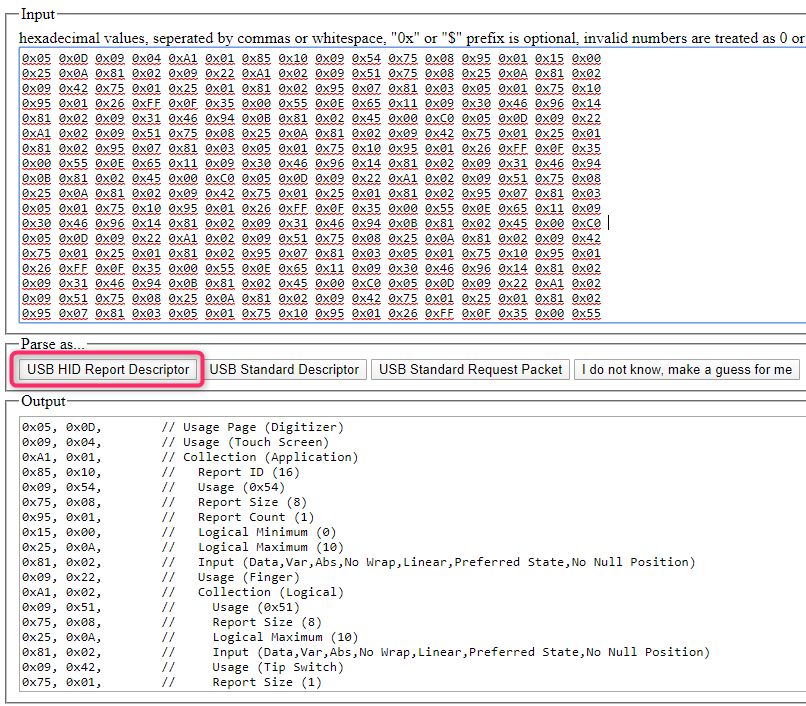
When we need a much more detailed interpretation of the HID Report Descriptor, we take just the hex contents of the .hid file and paste them into the online HID parser at https://eleccelerator.com/usbdescreqparser/.
For review
- Dropped the inline listing screenshot of the zip contents (a base64 image in 50714 already labelled 'from an older driver').
- Added from source: the report.txt section list (common/rundiagnostics.cpp:30-159), the _override.hid / _device.hid / updd_i2c_ files (api/internalapi.cpp:449-520), the Windows updd-calibrate-*.raw.txt copy (common/rundiagnostics.cpp:198-206) and that
diag dumphidwrites to the desktop (utils/main.cpp:5709-5722). Check this level of detail suits a customer page.