Licensing: keys, seats, maintenance and evaluation
The UPDD software is licensed software, and as such requires a licence per system when the production version of the software is installed. This document describes evaluation (unlicensed) mode, licence keys and their formats, seats, and the maintenance (support) period that comes with a licence, for UPDD 6 and UPDD 7.
How to register a licence is described in Registering UPDD, and how to release one from a computer in Releasing and moving a licence.
Production software
Production (registered) software is supplied either by pointer device manufacturers and system integrators, who are entitled to distribute the driver, or directly by Touch-Base. Production software runs without any time limitations or restrictions.
A UPDD driver never expires. Its dates are checked only when the driver is registered and when it is installed; once registered, the driver keeps working.
Evaluation mode
If you install an evaluation version of the driver, the 'Register' option is shown in the UPDD Daemon menu. Until it is registered the driver works for 200 touches per system restart, for 7 days. This restriction is removed once the driver is registered.
You are given a warning when the evaluation touches are nearly used up:

At the end of either period a notification is issued indicating either that the evaluation period has expired or, as in this example, that the touch limit for this session has been reached:

This notification is issued with each subsequent touch, and the UPDD Daemon icon in the system tray or menu bar shows an exclamation mark (as above) to indicate that touch has stopped working.
The Status dialog indicates the type of licence you have. When running an evaluation version it shows the number of touches remaining for this session and the number of days remaining; in this example the 7 day evaluation period has expired:
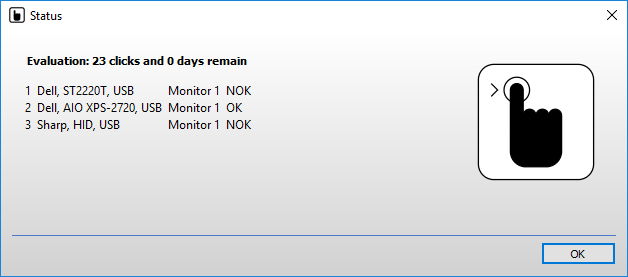
To purchase the driver after the evaluation, or to enter a licence key issued with the driver, register the driver as described in Registering UPDD.
Licence keys and seats
A licence key is the code you enter to register UPDD. A licence key normally licenses one system (one seat), but some keys hold more than one seat. A seat is associated with the computer it is registered on; once all the seats on a key are in use, the key cannot be used on another computer until a seat is released, as described in Releasing and moving a licence.
In July 2026 the UPDD licensing service was replaced by a new, more secure one, and the format of licence keys changed. Every old key has an equivalent new-format replacement, which permanently replaces it; old keys can no longer be used. Your licence itself is unaffected: the same entitlement and the same number of machines. Only the key and the way it is registered have changed.
| Old key | New key |
6454d031b20d613 characters, no dashes, starting with a 5 or 6 | UPDD-XXXXX-XXXXX-XXXXX-XXXXXbegins UPDD-, four groups of five |
Enter a new key exactly as it appears in the email, including the dashes. New-format keys are accepted by UPDD 7.1.228 and later. Older versions, including all UPDD 6 releases, cannot register a new-format key themselves: they use the UPDD Licence tool instead, as described in Registering UPDD.
When we send your new key
We do not send replacement keys out in advance. Your new key is emailed the first time the old key is presented to the licensing service, that is, the next time a machine tries to register with it. In practice it arrives at the point you next come to use the licence.
- It is sent to the address held against the licence, which may be a colleague's or the address used when the licence was bought.
- Each machine on the licence gets its own copy, once a day. A machine that keeps retrying does not produce a stream of emails, and if you have several computers on one licence each one still gets the key.
- If you hold a large number of keys, resellers in particular, no email is sent automatically. Please contact us and we will supply your replacement keys directly.
You do not have to wait for the email: your licence keys, including any replacements, can be looked up at any time in the licence manager at My Touch-base, described in Releasing and moving a licence.
If your new key has not arrived
- Look the key up yourself in the licence manager at my.touch-base.com.
- Check your spam or junk folder: the subject is "Your new UPDD licence key".
- The key is only sent once the old key has been used, so if nothing has tried to register yet, no email will have been sent.
- Consider whether the licence is held under a colleague's or a reseller's address rather than your own.
- If you still cannot find it, get in touch and we will send it to you.
Maintenance and support
When UPDD driver licences are purchased you are entitled to lifetime usage of the software, with the release of the software purchased at the time. Lifetime usage does not include lifetime support and upgrades.
The driver comes by default with 3 months support (maintenance and software upgrades), but when purchasing a driver licence you can also opt to purchase extended support for 1, 3 or 5 years, which allows you to upgrade your software to the latest release during the support period. The support period starts when the seat is first registered: in the licence manager a seat that has never been registered shows its support as a period, for example "5 years from registration".
As long as the licence is within its maintenance period you can download and install the latest release of the software from the Downloads tab of My Touch-base.
If the maintenance period has expired and you use the key with software released after the expiry date, the software is not licensed by it: the notification 'Licence support expired' is shown, and registration of a later release is refused (see Registration problems).
You can of course use the driver you purchased with the licence (it may or may not work, depending on the age of the driver and your operating system), or purchase an upgrade at 50% of the current licence fee. This comes with 3 months support and allows you to use the latest software. You can extend this support period for 1 year at 10% of the current licence fee, 3 years at 20% and 5 years at 30%.
To extend the support on a current licence key use our online purchase form at https://portal.touch-base.com/purchase/extend. You will be asked to enter the licence key; the email address entered on the form must match the email address associated with the key.
For review
Maintenance wording: (1) 50891 says "the installer checks the release date of the software being installed against the licence key support expiry date". In 7.1 the Windows installer's check is commented out (inno/updd.iss:276-289, ticket 378787), while the licensing service refuses registration of a build released after maintenance ended (portal app/Services/Licensing/BuildEligibility.php:69-81, message "This licence does not cover UPDD <version>, which was released on <date>, after the maintenance on this licence ended on <date>"). Please confirm which installers still make the check, so the sentence can name them. (2) The upgrade and extension percentages (50%, 10/20/30%) are carried from 50891 unverified; Crumble holds the pricing rule but not as literal percentages. (3) 50891's heading spelling "Expiried" is not carried.
Pre-licensed and pre-allocated licences
UPDD software is distributed by some larger organisations under a licence agreement that allows unlimited distribution; they are supplied a pre-licensed version for distribution, so no licensing step is needed.
Normally end users test, approve and purchase individual licences to run on their systems, typically 1 or 2 licences, through the purchase options in the driver's Register function. Where larger quantities of the driver are purchased for installation or distribution, typically in the order of 10, 50 or 100 licences, we can generate and supply a driver that is directly associated with pre-allocated licences held in our licence server. When the licences are set up they can be set for retrieval in one of the following ways:
| Licence retrieval method | Description |
| Automatic user retrieval | The software automatically retrieves a licence when it is installed. A connection is made to the licence server and, if a licence is available, it is taken and marked active against the system. In this case all online systems with the software installed become registered. |
| Manual user retrieval | The user requests the retrieval of the licence. The software is installed and stays in evaluation mode until the user selects the Register, Claim option. Opt for this method if the software is only to be registered on selected systems, as determined by the system integrator or end user. |
| Supplier controlled licence key | You control and distribute the licence keys. Automatic retrieval is disabled and the Claim option is not available. The user is given a licence key to enter in the Register function. Your licence keys can be seen at any time in the licence manager at My Touch-base. With this option you have full control, but will need some form of procedure to supply the licence keys to end users. |
If a system that needs to be licensed is offline, automatic retrieval and manual claim will not work and offline registration must be used.
For review
HELD WORDING (seat claim). The pre-allocated retrieval methods are carried from 50401, which describes the UPDD 6 licence server. Under the July 2026 service the driver's claim is matched by the computer's identity only (portal LicensingV2Controller.php:62-80: "Re-attach a machine that already holds a seat. Identity is computer_key_v3, nothing else"), so it is not clear that automatic or manual retrieval of a 'waiting' pre-allocated licence still works. Please confirm before publishing the table, or remove the first two rows. The V6 licence server account section of 50401 (license.touch-base.com "Create new account", the administrator email) was dropped: that sign-up no longer exists and licence management is at My Touch-base.
For review
HELD WORDING (evaluation). The evaluation statements are kept as the source articles give them (50322, 50245, 50288: "a certain number of touches (normally 200) per reboot for 7 days"). In the 7.1 source the daemon's warnings are "Evaluation: 20 touches remain until restart needed", "%1 touch limit expired; reboot to continue" and "The evaluation period has expired" (daemon/notifydialog.cpp:210-213). After a local unregister, a 7.1 driver from 2026-10-12 onwards is put into an expired evaluation, not a fresh one (common/register.cpp:115-121); this is not stated in the body. The Windows Status screenshot in 50245 (STStatus.PNG) was not carried; the eval screenshots are UPDD 6 era and may need replacing.