Downloading UPDD
This document describes how to obtain the UPDD driver software: requesting a driver from our download page, the My Touch-base link you then receive, the files delivered for each platform, and the choice between UPDD 6 and UPDD 7. Installing the software is described in Install UPDD on Windows, Install UPDD on macOS, Install UPDD on Linux and UPDD for Android.
If you are reinstalling and wish to retain previous settings or configurations, read Reinstalling and upgrading UPDD before installing.
Choosing UPDD 6 or UPDD 7
UPDD 7 is the current version. UPDD 6 remains available for the older operating systems that UPDD 7 does not support.
| Platform | UPDD 7 | UPDD 6 |
| Windows | Windows 10 and 11, 64 bit (Windows 7 64 bit with caveats; see Install UPDD on Windows) | Windows XP to Windows 10, 32 and 64 bit |
| macOS | macOS 10.14 and above, Intel and Apple silicon | Mac OS X 10.8 to 10.13, Intel |
| Linux | 64 bit (x64) | 32 and 64 bit |
| Android | Not available | x86 and ARM |
Requesting a driver
Driver downloads are requested from the download page on our website. The page offers the following options:
| Option | Use |
| MacOS 10.14 and above | Download the macOS device identification utility, which identifies the touch screens connected to your Mac and lets you request a UPDD 7 driver that supports them. The driver is a universal build that runs natively on Intel and Apple silicon systems. |
| Windows 10/11 64-bit HID | Request the generic Windows HID driver, which supports modern HID-compatible USB and I2C touch screens on Windows 10 and 11. A download link is emailed to you. |
| MacOS 10.8-10.13 | Download the device identification utility to request a UPDD 6 driver, which runs natively on Intel systems. It can also run on later versions of macOS but requires Rosetta 2 on Apple silicon. |
| Choose from a list | Choose your operating system and your monitor or touch device, then click Request driver. You can request a single installer for up to 4 devices. |
| Manual request | For devices that are not listed, or where the list asks you to use this option: choose your operating system, enter the manufacturer, model and connection (for USB, the vendor and product id) and click Assistance. Touch-Base support will send the appropriate software or contact you by email to clarify your requirements. |
Where you have selected a known touch device on a supported operating system, the driver is built and emailed to you automatically. macOS drivers have to be individually notarized by Apple; this takes around 10 minutes but can take longer at busy times.
How to find the USB vendor and product id of a device is described in Identifying a touch device.
Device identification utility
Ensure the USB touch device is plugged into the system (touch monitors normally have both a video and a USB cable), then run the utility.
The utility identifies and lists the USB devices and automatically highlights any that are already known or, if none of your USB devices are known, lists all the USB devices so that you can identify and select the touch device manually.
In either case, once you have selected the device and filled in your details the OK button is activated. If the driver build request is successful you are notified that it has been accepted:
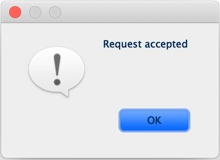
The driver is built and an email is sent to you containing the link to the installer.
The OK button is only activated once all the required information has been entered.
Automatic selection
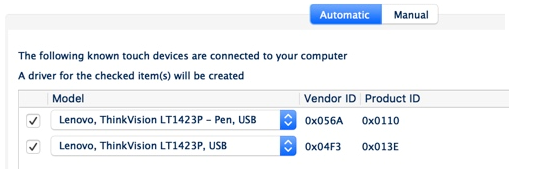
In this example the utility has identified that the USB device is listed in our database of supported devices and offers various options to select from:
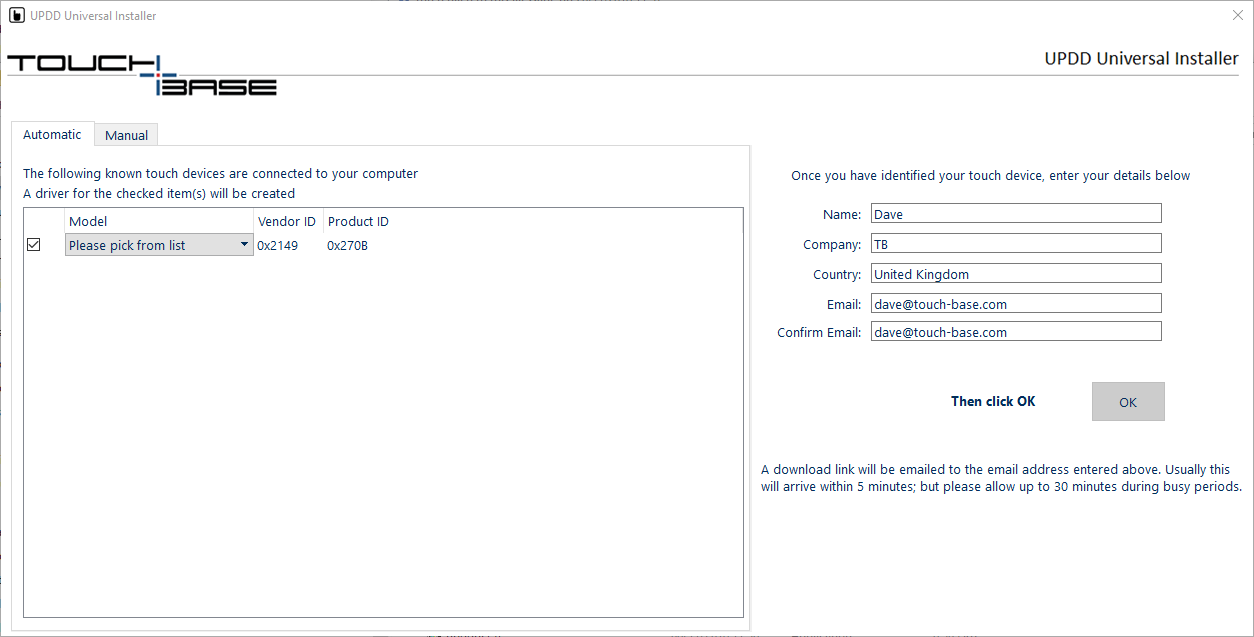
For each known USB device listed (more than one known touch device can be connected to your system) use the dropdown to select the most appropriate option; in this case two devices match the USB characteristics:
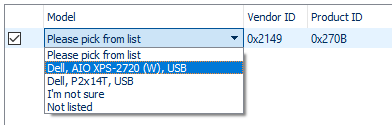
If only one device matches the USB characteristics, its name is selected automatically in the dropdown.
| Option | Selection |
| Named device | Select the device name that matches the one you have and the driver is built to support the named device(s). |
| I'm not sure | The driver is built with the generic device name 'Universal Pointer Device Driver'. |
| Not listed | Enter the name that best describes your touch device or monitor, e.g. Dell, TS1234. The driver is built with the name entered.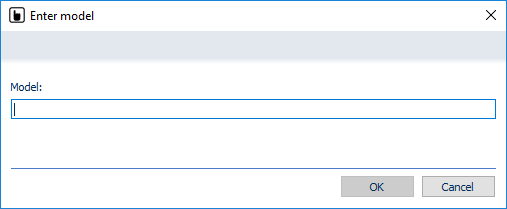 |
A driver is built to support each device selected (where the check box is ticked), as in this Mac example that has discovered two known devices:
Manual selection
Where none of the USB devices is known as a supported device, or you want to select a USB device manually, use the Advanced tab to select from a list of all the USB devices discovered on the system, as in this example:
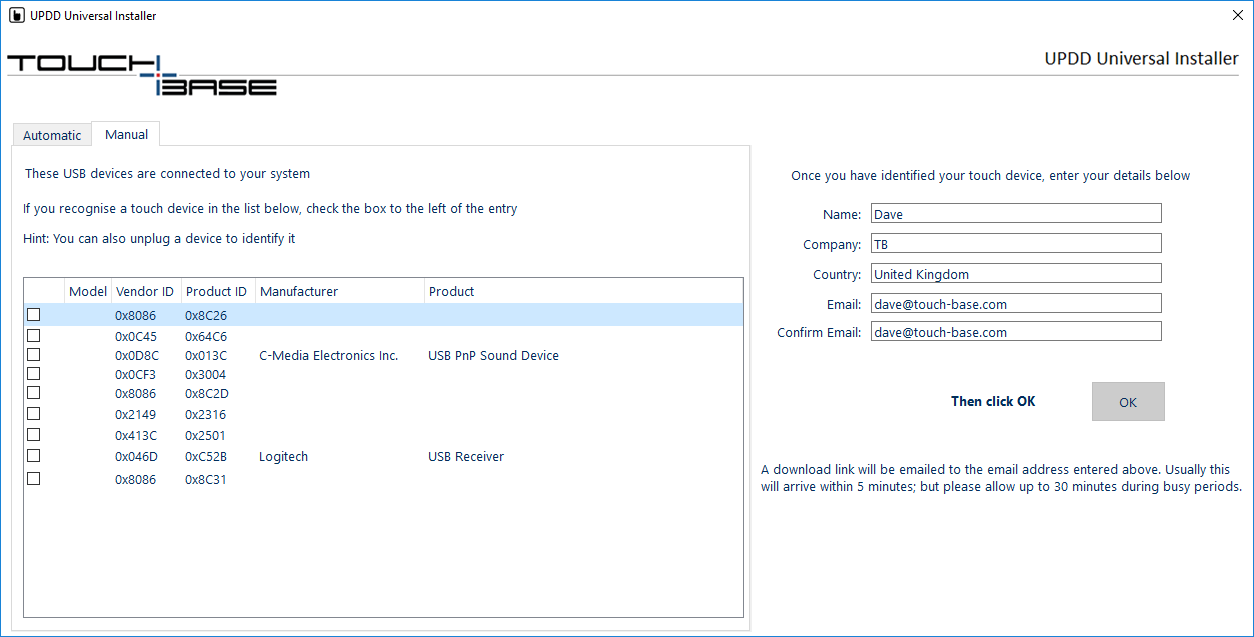
Tick the check box of the device you believe to be the touch screen (there may be a clue in the manufacturer name).
Note: if the device is connected by an external USB cable you can unplug the cable and the entry is selected automatically. This is a useful way to identify the touch screen.

Once you have selected the device, enter a sensible identifier. In the example above the touch device is in a Dell P2314T touch monitor, so you would type this into the identifier field. The driver is generated with the name you enter.
Note: manual selection is intended for unknown devices. If any devices are known when viewing the Manual tab, the dropdown selection is that of the known device, as shown in Automatic selection above.
For review
Two points on requesting a driver. (1) The download page (portal resources/js/pages/Download.vue:402-420) shows the device identification utility on the "MacOS 10.14 and above" tab only while MAC_HID_AUTO_ENABLED is off (its default, config/licensing.php:86); when it is on, that tab instead emails a link to the generic macOS HID driver. Confirm which is live. (2) The utility screenshots were taken on Windows, where the utility is no longer offered; macOS screenshots would be better.
Your download link
The software is delivered as a My Touch-base link in an email. The link opens a page, 'Your UPDD driver download', showing the build details: the UPDD version, the operating system, the bundle, the file name, the date the package was created and the supported controllers. Click Download to download the file. We recommend that you save the file rather than run it from within the browser.
The built file is only kept on our servers for a few days, so download it when you receive the email. If it has been removed when you come back, the page offers to rebuild it: the rebuild is exactly the same driver version and controller support as the original and is emailed to you, usually within a few minutes, with the same link. The link in your email always stays valid.
Where a newer UPDD version is available the page also offers it. A release that your licence's maintenance does not cover still installs as an evaluation, or it can be covered by registering it with a licence you hold or by extending your support; see Licensing: keys, seats, maintenance and evaluation.
Once you have downloaded it, the link is also listed among the downloads in your My Touch-base account.
File names
The name of the downloaded file reflects the version of the driver being installed:
| Platform | File | Example |
| Windows | UPDD_<version>.zip, containing the Windows installer | UPDD_07_01_260.zip |
| macOS | UPDD_<version>.dmg, a disk image containing the installer package, which is handled by the standard macOS installer | UPDD_07_01_260.dmg |
| Linux | linux_x64-<version>.tgz, a compressed file with an integral installer | linux_x64-07_01_260.tgz |
| Android (UPDD 6) | A compressed file named for the hardware architecture | armeabi_v7a-06_00_428.tar (ARM installer) or android_x86-06_00_428.tar (Intel installer) |
For review
The Windows file name is unresolved (review item E26). tbas names the Windows download UPDD_<version>.zip (tba/tbas/tbasmessagedispatcher.cpp:748-753), but the old Windows articles show an .exe (updd_06_00_115.exe). Confirm what a customer receives today, whether the .zip contains the setup .exe (and so must be extracted first), and correct the Windows row and the installation steps to match.