Qt applications: the UPDDTouch plugin
This document is aimed at developers of Qt client applications that use Qt touch events, and at users of such applications on macOS.
Qt is a cross-platform application framework for Windows, macOS and Linux. The Qt API includes the QTouchEvent API to respond to touch events; this works as standard on Windows, but not on macOS, where touches from the UPDD driver reach a Qt application only as mouse events.
The UPDDTouch Qt plugin allows any touch-enabled Qt application to receive multi-touch events on macOS from a UPDD supported touch device. By simply adding the plugin, the touch events work the same as they do on Windows. Except for a small code change to load the plugin, no other source code changes to the application should be required.
Installing the plugin
To use the plugin with your application, make sure the compiled plugin is included in your application's Qt plugin directory, in a subfolder named generic. Where the Qt plugin directory is varies from one Qt application to another and depends on how it is deployed. See the following Qt documents for more information:
- https://doc.qt.io/qt-6/deployment-plugins.html
- https://doc.qt.io/qt-6/macos-deployment.html#qt-plugins
The version of the plugin used must not only match the Qt version of the host application in both its major and minor version but also use the same Qt dynamic libraries as the host application. For example, an application built with Qt 5.12 must use a Qt 5.12 version of the plugin. Most Qt applications for macOS link to Qt's frameworks in a standard way, particularly if they are prepared for release using Qt's macdeployqt tool. In this case the pre-built plugins provided by Touch-Base should work without any alteration; if you need one, raise a ticket stating the Qt version in use. You can install the plugin into your Qt installation's plugin directory for use during development, and then copy it into your application bundle when deploying, into the Contents/PlugIns/generic subdirectory.
Building the plugin
If you are building your own version of Qt, statically linking to Qt, or not linking to Qt's frameworks in the same manner as is set up by macdeployqt, you may need to build your own copy of the UPDDTouch plugin. To this end the source code is provided here. It should compile in any version of Qt 5 or 6. The plugin is of the Qt plugin type generic and builds as libqupddtouchplugin.dylib.
A plugin built with Qt 6 links the UPDD V7 API, libupddapi.7.0.0.dylib. A plugin built with Qt 5 links the UPDD V6 API, libupddapi.1.0.0.dylib, which must reside in the folder /Library/Application Support/UPDD. With UPDD V6 this file is part of the software. With UPDD V7, either request that the driver is supplied with 'V6 components' (UPDD V6 compatibility, Qt 5) or download the file libupddapi.1.0.0.dylib.
Loading the plugin
To load the plugin when your application runs, either specify a command line option when the application is launched, e.g.:
/Applications/MyQtApplication.app/Contents/MacOS/MyQtApplication -plugin UPDDTouchor make a simple code alteration to your application so that the plugin is always loaded. To do so, add this code before you instantiate QApplication in your application's main function (or wherever suitable):
QByteArray prevValue = qgetenv("QT_QPA_GENERIC_PLUGINS");
if (prevValue.isEmpty()) {
    qputenv("QT_QPA_GENERIC_PLUGINS", "UPDDTouch");
} else {
    qputenv("QT_QPA_GENERIC_PLUGINS", prevValue + QByteArray(",UPDDTouch"));
}
You can also statically link the plugin into your application, which means that it is not necessary to include the plugin's dynamic library when deploying the application. See this Qt document for more information: https://doc.qt.io/qt-6/plugins-howto.html#static-plugins
Configuring UPDD Commander
When UPDD Commander is running, it must be configured to send touches to the Qt application that uses the plugin, so that the plugin can receive them and send them into the application:
- Add the application to Commander and give it the gesture All Touches > Pass all touches to UPDD client app, so that touches within the application skip gesture processing and go directly to the application.
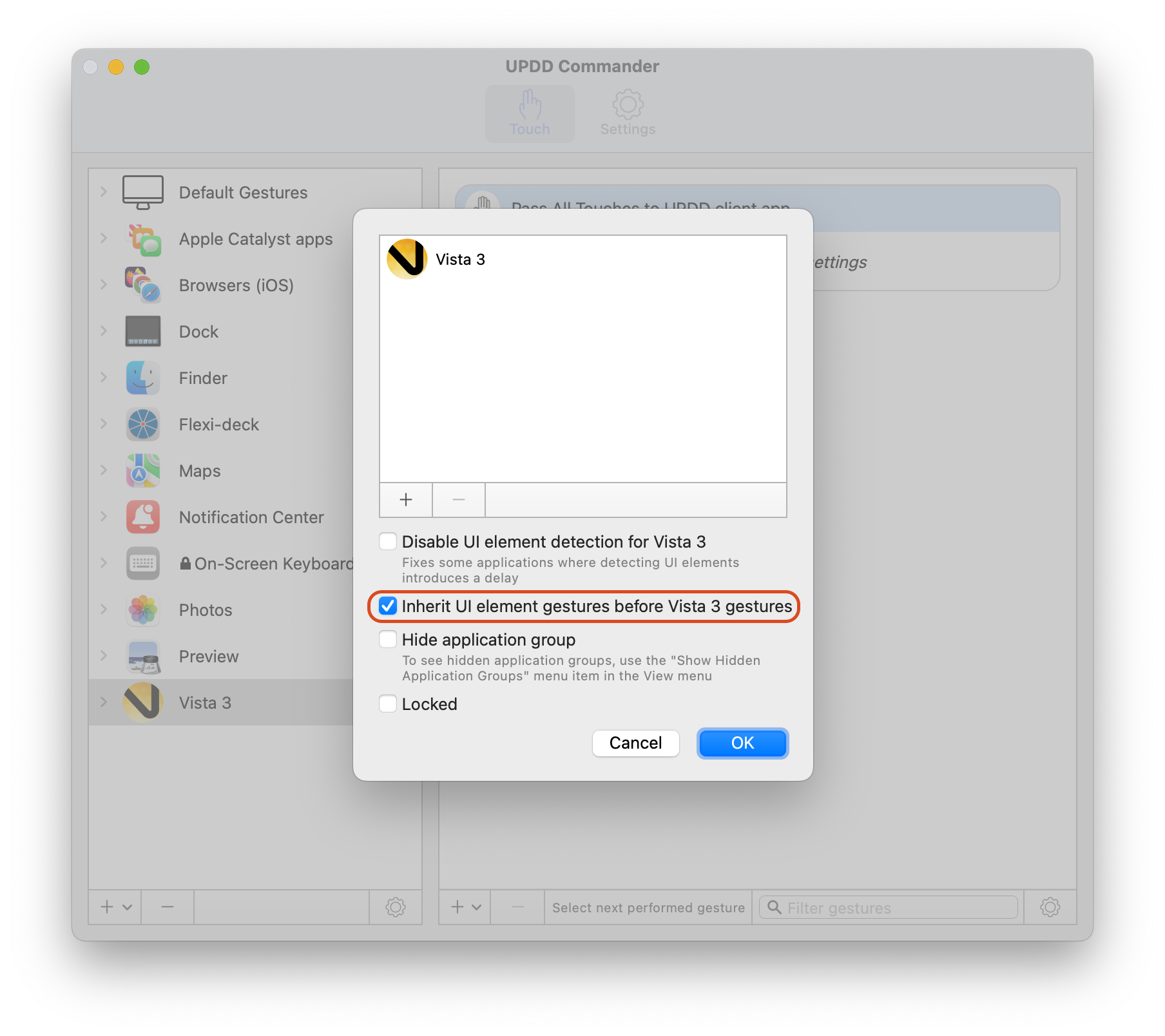
- Check Inherit UI element gestures before [app name] gestures for the application, so that touches on UI elements configured under "Default Gestures", such as menus, window title bars and system file dialogs, continue to work. This is important because these UI elements do not respond to Qt touch events, so when the user touches them UPDD Commander needs to process gestures and produce mouse clicks that can interact with them.
The procedure is described step by step in API applications alongside UPDD Commander. In this example, the inherit setting is set for the Qt application Vista 3:
Vista by Chroma-Q
The Vista 3 lighting and media control software is a touch-aware Qt client application whose touch control works on Windows, but not on macOS, because the Qt touch events used for touch input within the application are not natively satisfied within macOS.
Using Vista with the standard UPDD software, touch works purely through the mouse emulation implemented by UPDD Commander, offering click and click and drag type capabilities. To use the Vista 3 touch capabilities, the UPDDTouch Qt plugin receives touches from the UPDD driver and delivers them so as to satisfy the Qt touch events. This allows full touch interaction with the application under macOS, including multi-touch where implemented, such as multiple simultaneous slider use.
In February 2024 the released version of Vista 3 used Qt 5, and this section relates to that version. UPDD also uses Qt: UPDD V6 uses Qt 5 and UPDD V7 uses Qt 6. Since UPDD Commander requires UPDD driver 7.1.121 or later to work correctly with Vista, the UPDD V7 driver must be built with "UPDD v6 compatibility (Qt5)" so that the Qt 5 plugin will load.
| Component | Description |
| UPDD 7.1.121 or later | UPDD touch driver that supports the touch screen in use and includes V6 compatibility (the file libupddapi.1.0.0.dylib must reside in the folder /Library/Application Support/UPDD) |
| Vista 3 | Vista 4.1 beta or above (Vista R5 is available). Modified version that loads the Qt 5 touch plugin. |
| Qt 5 plugin | The Qt plugin used to interface between the UPDD driver and the Qt client application's touch events |
| UPDD Commander preset | Used to disable UPDD Commander mouse emulation within Vista when native touch is being used |
Setting up Vista for touch
To use Vista touch, download and install these components and configure them as follows:
| Component | Installation notes |
| UPDD V7 | You must be using UPDD driver version 7.1.121 or later with UPDD Commander 1.6.2 or above. Request the driver through https://www.touch-base.com/contact. |
| Vista 3 | Download a pre-release of the R4.1 macOS touch version and install it in the normal manner. When the plugin was developed, the publicly available version was R4; R5 is now available. A show file created with the R4.1 version may not be compatible with R4.0. |
| Qt 5 plugin | Download and copy the plugin to ~/Documents/Vista 3/plugins/generic/libqupddtouchplugin.dylib. It may be necessary to create this folder, as it is not created by a Vista installation. |
| Commander preset | The Vista 3 preset configures Commander gesture processing for touches in Vista. You can add the preset from within Commander if it is available: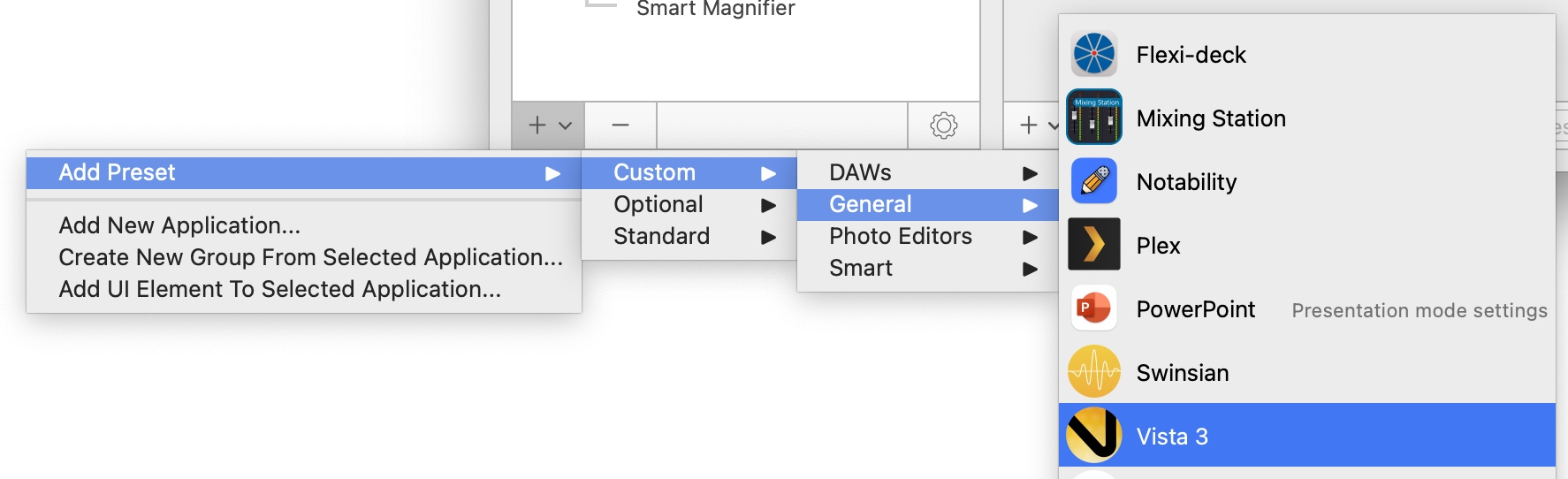
Alternatively, download the preset and copy it to /Library/Application Support/UPDD/commander presets. Import the Vista 3 preset (Vista 3.ucapp) into UPDD Commander: open the Commander settings dialog and use the File menu, Import Application option: 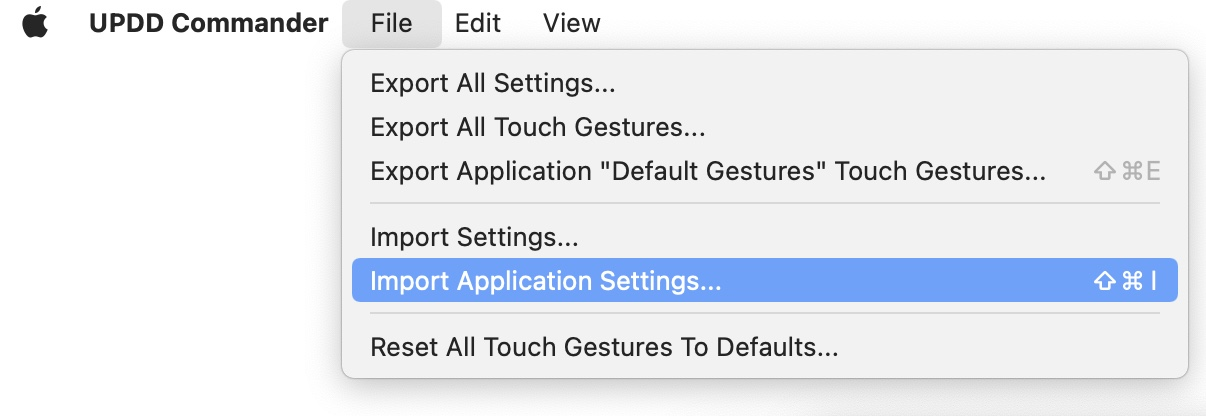
Select the Vista 3 preset file in the Finder dialog to import the application's Commander settings. Once the application is added it shows the settings required by the application: 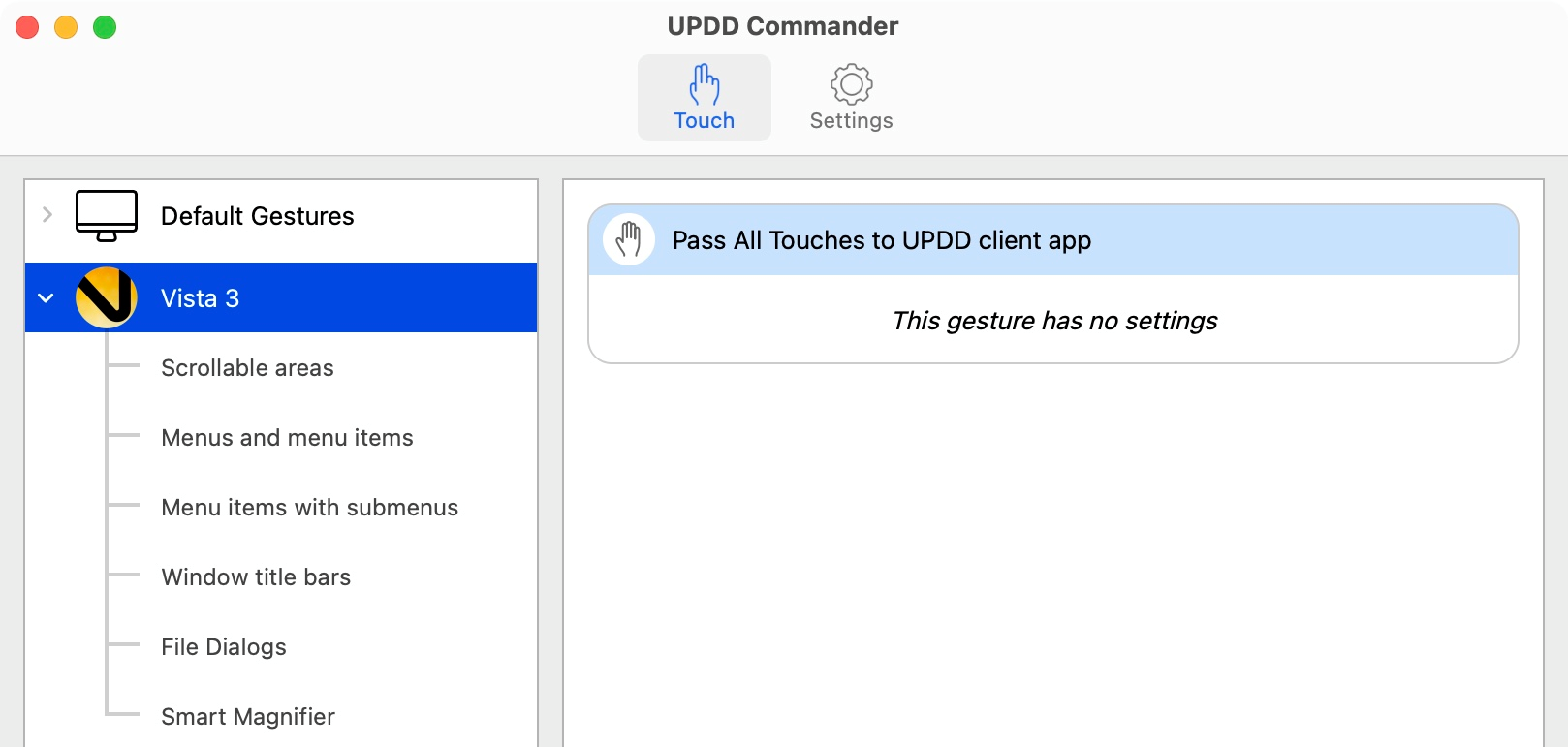
Finally, instruct Commander to inherit the UI element gestures defined under Default Gestures, as described in Configuring UPDD Commander. |
With the above in place, native touch should work within the application.
Vista touch and mouse use
Certain Vista 3 widgets are activated with a mouse, or a touch screen emulating mouse clicks, via the Qt mouse event API. To cater for this, the Qt plugin also processes clicks and clicks and drags performed on these widgets so that they satisfy the Qt mouse events.
Several areas in Vista 3 benefit from multi-touch, including the console control widgets and the widgets known as Quick Pickers, which allow the activation of various components. These benefit from being able to register multiple touches simultaneously. In addition, a few areas use gestures: some use single finger gestures, and one uses multi-finger gestures.
With UPDD Commander support for Vista 3, touches are still delivered to the application as mouse clicks wherever native touch is not used, including the main window of the application, so placing it on the touch display gives exactly the behaviour expected for touches and mouse handling. Vista 3 operates in a hybrid mode where touch and mouse work together.
For review
Vista version requirements disagree: the Vista article requires UPDD 7.1.121 or later with Commander 1.6.2, while the "Adding touch support" article said Vista 4.1 "should be used with UPDD 7.1.126 and above". The 7.1.121 figure is used here; please confirm the minimum driver build.
The Vista material dates from February 2024 (Qt 5 plugin, R4.1 pre-release download). The old sentence promising a different plugin for a Qt 6 release of Vista was dropped. Please confirm whether Vista R5 still needs the Qt 5 plugin and V6 compatibility. The Vista 3 and Mixing Station presets ship in the macOS ExtraApps preset customisation (config/v6/custom/commander_preset-ExtraApps-osx).
The UPDD V7 row no longer offers a trial download from touch-base.com/download (static download URLs are not used); it points to a ticket instead. The Commander version link still points at the old Commander history article, which has no new topic yet.