Installation problems on macOS
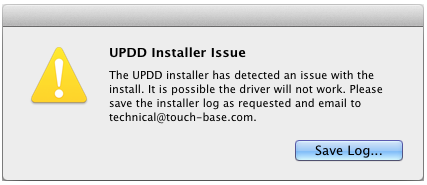
The UPDD installer creates an installer log file and reports any errors it detects during installation. Depending on the nature of the error the driver may or may not be working. This document lists the installation problems we have seen on macOS. The installation itself is described in Install UPDD on macOS.
The installer log
If an installation run with the standard installation application (Installer) fails, and the failure is detected, a dialog asks you to send us the installer log. Attach it to a support ticket raised at https://www.touch-base.com/contact.
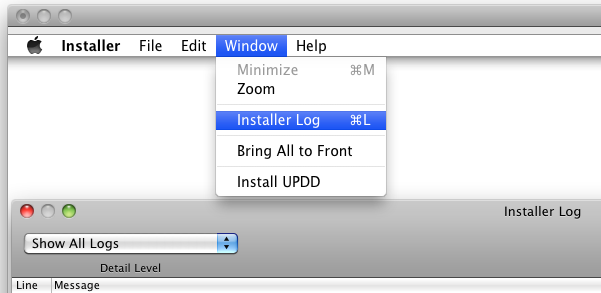
If the installation hangs, or fails without the installer detecting it, the log can be viewed from the Installer menu, as shown here:
Unable to stop the running driver
When reinstalling UPDD, the installer stops the running driver. One failure we have seen was the installer being unable to do so, explained in the log as:
./preinstall: preinstall warning: Cannot terminate updd before installing
The installer could not make updd (the driver) quit, or it took longer than expected to quit. The installer uses the strongest possible method to end a process (sending it SIGKILL) if it does not stop when asked. It is likely that it did eventually quit, as the user reported everything as working.
No write access to /usr/local/bin
Running the UPDD installer requires write access to /usr/local/bin. If the permissions on this folder are wrong the installation fails, as described in macOS: /usr/local permissions.
Driver does not load after installation
In one case the UPDD settings database was not created during installation. Touch did not work, and the UPDD menu bar icons showed an exclamation mark, indicating that they could not communicate with the driver:  .
In this instance a restart recovered the situation.
After installation
If the touch device was handled through a system extension by the previous driver and is not working after installing a newer one, see Removing an older extension. If touch does not work after a successful installation, check that the extension has been allowed, where the driver needs one (macOS: allowing the UPDD driver extension), and that the permissions have been given (macOS: Accessibility, Input Monitoring and background items); then see Touch not working: first steps.
For review
50334's kext, kextcache, spctl kext-consent and SIP sections were already deleted by the correction pass; its 'Permission granted but still no touch' section is now in macos-permissions. 50585 (stuck boot progress bar, PRAM reset, one report not attributed to UPDD) is retired and nothing is taken from it. The 'Unable to stop the running driver' wording comes from the UPDD 6 era preinstall script: confirm the V7 installer still logs 'Cannot terminate updd before installing'.