Software notarisation
This page is kept for links that point to it. It describes versions no longer supported or a feature no longer offered; the current documentation is reachable from the index.
Notarization is a new concept introduced in macOS Mojave (10.14.5) for apps distributed outside of the Mac App Store with the aim of protecting users from rouge or malicious Mac apps.
This gives users confidence that our software is approved by Apple. Starting with 10.14.5 only kext (kernel extension) files need be notarized. UPDD employs a codeless kext file that defines the USB touch devices supported by the driver such that the native USB/HID class driver does not try to take control, leaving it available for UPDD driver access.
The UPDD driver production system submits the kext of each driver build to be approved and notarized. This service automatically scans our Developer ID-signed software and performs security checks and applies a ticket to the software to let Gatekeeper know it’s been notarized.
Any UPDD builds installing non-notarized kext files will not work as the kext file will be rejected thus:
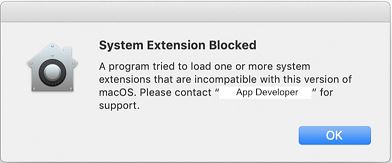
Software already installed will NOT be impacted because our Developer ID account has been around since before April 7, 2019.
With MacOS release 10.15 all UPDD components needed to be notarized, not just the kext file, and full component notarization ships with UPDD 6.0.513 and above.
As discussed above the macOS Mojave 10.14.5 update is a significant change in the way that it handles third-party kernel extensions. As part of this change there is also an updated version of the KEXT block extension, AppleKextExcludeLList.kext in /System/Library/Extensions.
Until 10.14.5, AppleKextExcludeLList.kext contained one Property List, KnownPanics.plist, which detailed kernel extensions known to Apple to be the cause of kernel panics, thus excluded from loading in Mojave; that hasn’t changed in 10.14.5. However, this kext now contains a second property list, ExceptionLists.plist, which is a long dictionary of “secure timestamp exceptions”.
Each entry consists of a string of hex digits, which is presumably an identifier or hash, together with the kext ID (such as com.thiscompany.mykext) and its version number. These appear to be an exhaustive list of over 18,000 existing kernel extensions which have been granted exceptions to the notarization requirement. This list includes the UPDD kext but we are not sure if this reference is to a specific version of the kext or is a general reference. However, its good to see our kext in the approved list.
Notarization validation
We are occasionally asked how to confirm our software conforms to Apple's notarazation requirements.
Apple doesn't specifically provide documentation that apps have been notarized, outside of emails confirming that the notarization process succeeded for individual releases as part of the software build process.
However, you can confirm that Touch-Base's kernel extension and installers are notarized using the following terminal command on a system running macOS 10.14 or above
xcrun stapler validate [path]
where [path] is a valid POSIX path to a Touch-Base pkg installer, or its kernel extension, which is located at /Library/Extensions/tbupddmxhid.kext on a system where the driver has been installed. An easy way to get the correct command is to type:
xcrun stapler validate
...followed by a space, and then drag the pkg file on to the terminal window to have it automatically type its full path.
The xcrun command may require Apple's command line developer tools to be installed. If so it should inform you on how to do so when you try to use xcrun.
If the file is correctly notarized you will see output like this:
Processing: /Library/Extensions/tbupddmxhid.kext
The validate action worked!
You can also pass --verbose to the command to get more information, such as:
xcrun stapler validate --verbose /Volumes/UPDD_06_00_645/UPDD_06_00_645.pkg
which will provide more information about the notarization ticket that has been "stapled" to the file.